A1
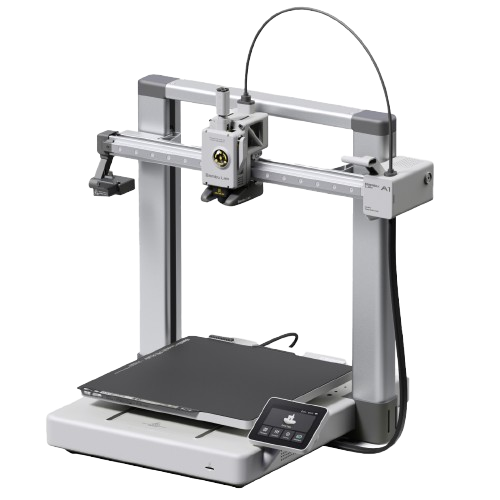
The A1 mini with room to grow. Same easy setup, same print quality, but 256mm of build volume instead of 180mm. The sweet spot for most beginner-to-intermediate users.
Should I buy the A1?
Yes, if you want more print volume than the A1 mini for $60 more. The 256mm build covers most hobby use cases comfortably, and the AMS Lite combo at $359 is the cheapest Bambu multi-color combo with a bed of 256mm or more (only the smaller A1 mini Combo, $299, costs less).
Links to Amazon are affiliate links. We may earn a commission at no extra cost to you.
Store price and the 90-day low
Official Bambu Lab US store, checked November 3, 2026.
| Configuration | US store price |
|---|---|
| A1 | $259 |
| A1 Combo | $359 |
| 90-day low, A1Oct 27 to Nov 6, 2026 | $259 |
The 90-day low is the lowest price in our daily log of the US store, Aug 9 to Nov 6, 2026.
Black Friday 2026
Bambu lists the A1 Combo at $359 from October 27 to December 1, against a typical price of $399. Our log has had it at $399 every day since October 4.
Full specifications
- Isometric view.
- Source: Bambu spec page bambulab.com/en-us/a1/tech-specs, checked 2026-10-07
| Build volume | 256 × 256 × 256 mm (10.1 × 10.1 × 10.1 in) |
|---|---|
| Max speed | 500 mm/s |
| Acceleration | 10,000 mm/s² |
| Motion system | Bed-slinger |
| Layer height (0.4 mm nozzle) | 0.08–0.28 mm (Bambu Studio default range) |
| Extruder | Direct drive |
| Nozzle (stock) | 0.4mm stainless steel |
| Nozzle max | 300°C |
|---|---|
| Bed max | 100°C |
| Enclosure | No |
| Heated chamber | None (open) |
| Bed surface | Textured PEI (magnetic) |
|---|---|
| Auto leveling | Yes (strain gauge) |
| Vibration comp. | Yes |
| Flow calibration | Yes (automatic) |
| HEPA / carbon filter | No |
| AMS | AMS Lite (4 colors); AMS, AMS 2 Pro or AMS HT via A Series AMS Hub (up to 4 units) |
| Camera | Built in, low frame rate (up to 1080p), timelapse |
| Display | 3.5" touchscreen |
| Connectivity | Wi-Fi 2.4 GHz, Bambu-Bus, microSD card |
| Machine dimensions | 465 × 410 × 430 mm |
| Weight | 8.3 kg |
| Power supply | 100–240V AC, max 1300W at 220V / 350W at 110V |
| Noise level | Under 48 dB in Silent Mode (Bambu) |
Who should buy the A1?
PLA and PETG hobbyistGood fit
Bambu rates PLA, PETG, TPU and PVA as ideal, and 256 × 256 × 256 mm is the same build volume as the P1S, P2S and X1 Carbon. A1 vs P2S (Bambu A1 specs)
MulticolorGood fit
One AMS lite adds four colors, or the A Series AMS Hub (sold separately) connects up to four AMS, AMS 2 Pro or AMS HT units instead. A1 vs P1S (Bambu wiki)
ABS, ASA and engineeringLook elsewhere
The bed reaches 100°C, but Bambu rates ABS, ASA, PC, PA and fiber-filled filament as not recommended on the open A1; the enclosed P2S handles them. A1 vs P2S (Bambu A1 specs)
Upgrading from the A1 miniGood fit
Same open design, materials and AMS options, with 256 × 256 × 256 mm instead of 180 × 180 × 180 mm and a 100°C bed instead of 80°C. A1 vs A1 mini
Known issues
- US recall: A1 printers sold before January 30, 2024 (letter A as the sixth digit of the serial number) can have a damaged heatbed cable; Bambu offers a refund or a replacement heatbed and cable. Check the serial number on a used A1. (Bambu recall notice)
- Updating offline from 01.04.00.00 or older to 01.08.01.00 can show garbled text; Bambu's fix is to run the offline update again or connect the printer to the network. (Bambu release notes)
- Only one AMS lite per printer, and it cannot be combined with the AMS, AMS 2 Pro or AMS HT. (Bambu wiki)
Known issues only from Bambu's own wiki, firmware release notes, FAQ, blog and recall pages, checked October 2, 2026. Specs: our table above and Bambu's spec pages.
Verdict
The A1 is the A1 mini with a bigger plate and a slightly higher price. Everything good about the Mini translates directly: auto-calibration, reliable first prints, good ecosystem integration, and AMS Lite for multi-color. The 256mm build volume is the standard Bambu footprint shared with the P1S, P2S, and X1C, a practical size that handles most hobby printing comfortably.
The AMS Lite combo at $359 is the cheapest way into Bambu's multi-color ecosystem with a bed of 256mm or more; only the smaller A1 mini Combo ($299) costs less. Still no enclosure, so ABS and ASA are off the table even though the bed reaches 100°C. If you need engineering materials, spend more on the P2S.
Pros & Cons
Pros
- Excellent out-of-box experience
- 256mm build volume covers most use cases
- Full auto-calibration suite
- AMS Lite combo makes multi-color accessible
- Good Orca Slicer integration (LAN+Dev mode)
- Compact for its volume
- Active community, lots of help available
Cons
- No enclosure. ABS/ASA not reliable
- AMS Lite holds 4 spools; full AMS types need the separate A Series AMS Hub and cannot be mixed with it
- Camera is low frame rate, not a live video feed
- No activated carbon filtration
- Cloud-dependent by default (workaround exists)
Material compatibility
Filled circle: works well. Half: capable, or only with upgrades. Empty: not recommended.
| Material | Support | Notes |
|---|---|---|
| PLA / PLA+ | Native | Excellent. Default material. |
| PETG | Native | Works well. Use glue stick on PEI to prevent over-adhesion. |
| TPU (90A–95A) | Supported | Direct drive handles TPU. Print at about 35–40 mm/s (Bambu Studio's Generic TPU profile caps flow at 3.2 mm³/s); TPU 85A is not compatible with the A1 series. |
| PLA-CF / PLA-GF | Not recommended | Bambu's rating for fiber-filled filament on the A1. Abrasive: if you try it, swap to a hardened nozzle first. |
| ABS | Not recommended | Warping without enclosure. |
| ASA | Not recommended | Same as ABS. |
| PA / Nylon | Not recommended | Bambu's rating for the A1 (PA and PC). |
Setup tips
- First boot
- Run auto-calibration before your first print (~10 minutes). Sets vibration compensation and flow correctly.
- LAN mode
- Enable LAN Only + Developer Mode in Settings for Orca Slicer. Use the access code and local IP.
- Bed adhesion
- Textured PEI grips PLA without glue. Wash it with warm water and dish soap when adhesion drops (Bambu); a 90%+ IPA wipe between washes is fine. For PETG, use glue stick as release agent.
- AMS Lite
- Start with one spool, add AMS Lite when you want multi-color. It connects easily after the fact.
Common questions
A1 or A1 mini?
Mini for small prints under 180mm. A1 if you're unsure or want headroom. The $60 difference ($259 vs $199) is worth it.
A1 or P2S?
Same build volume, but the P2S ($449) is enclosed, 600 mm/s, and has an activated carbon filter. Get the P2S if you want ABS/ASA. Get the A1 if you only print PLA/PETG and want to spend less.
Can the A1 use the full AMS?
Yes, with the A Series AMS Hub (sold separately) and firmware 01.07.00.00 (October 2025) or later: up to four AMS, AMS 2 Pro or AMS HT units in any combination; select the type under Settings → AMS Options → AMS Type. The AMS Lite cannot be combined with them. Needs Bambu Studio 2.3.0 and Bambu Handy 3.8.0 or later.
Orca Slicer?
Yes. Enable LAN + Developer Mode, connect via IP. Works fully with the A1.
Starter accessories for the A1
What we would add to a new A1 in the first month.
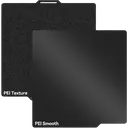
UniTak Double-Sided PEI
Double-sided 257 mm plate that fits the A1. Smooth side for glossy bottoms, textured side for easy release.
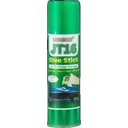
TEQStone Bed Adhesive
Keeps PETG from over-bonding to the A1's textured plate and helps tricky first layers on large flat parts.
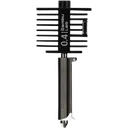
Bambu Hotend A1/A2, hardened steel
Bambu's own hotend in hardened steel for the A1 (also fits the A1 mini and A2L). It replaces the whole stock hotend, since nozzle and heatsink are one part, and is what abrasive CF and GF blends need.
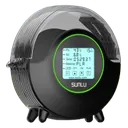
SUNLU FilaDryer S2
The open-frame A1 exposes filament to room humidity. A dryer keeps PETG and TPU printing cleanly.
Affiliate links. We may earn a commission at no extra cost to you.
Compare this printer
Links to Amazon are affiliate links. We may earn a commission at no extra cost to you.
Related reading
- Which Bambu Lab Printer Should I Buy?Honest printer recommendations based on what you actually need. Compare A1 mini, A1, P1S, P2S, X2D, H2S and H2D by use...
- Bambu Lab Routine Maintenance ChecklistWeekly, monthly, and quarterly maintenance routine for Bambu Lab printers. Keep your X1C, P1S, P2S, A1, or H2S running...
- Bambu Lab Hotend and Nozzle Replacement GuideModel-specific hotend replacement guide for X1 Carbon, P1S, P1P, A1, A1 mini, P2S, X2D, H2D and H2S. Covers tool-free...
- Bambu A1 Combo vs Creality SPARKX i8 (2026)Creality's SPARKX i8 puts four filament channels in one toolhead and prices it at the A1 Combo's $399. What is claimed...
Sources
4 sources, including Bambu Lab product pages and Bambu Lab wiki. Last checked November 3, 2026.
ShowHide
- Bambu Lab US store, A1bambulab.com/en-us/a1Store and Combo prices, checked November 3, 2026
- Bambu Lab A1 tech specsbambulab.com/en-us/a1/tech-specsSpecifications, checked October 2, 2026
- Bambu Lab Wiki, A1 firmware release historywiki.bambulab.com/.../a1-firmware-release-historyFirmware version and date, checked November 3, 2026
- BambuHub daily store logbambuhub.net/bambu-price-tracking90-day low, our daily check of the US store
What changed
Newest first, from this page's version history. Only changes to text you can read here; date refreshes and reshuffled reading links are left out.
- Daily price log now includes the Black Friday prices of October 27.
- Bambu US store price update: A1 Combo $359 (was $399), A1 mini Combo $299 (was $329), A1 $259 (was $299), A1 mini $199 (was $219), P2S $449 (was $549).
- Black Friday 2026: Bambu's sale price for the A1 Combo (October 27 to December 1) against the lowest price in our log.
Earlier changes
11 older entries, Jul 8, 2026 to Oct 9, 2026.
ShowHide
- A1 mini prices back at $219 and $329 for the Combo (was $209 and $315.50); the gap to the A1 is $80 again.
- Spec table: layer height is now 0.08 to 0.28 mm, the Bambu Studio default for the 0.4 mm nozzle (was 0.05 to 0.35 mm); A1 mini prices now $209 and $315.50 for the Combo; hardened nozzle pick is now Bambu's Hotend A1/A2.
- TPU row corrected to 90A to 95A (was 85A to 95A), as TPU 85A is not compatible with the A1 series; print at about 35 to 40 mm/s (was 30 to 40 mm/s).
- Added Who should buy and Known issues, including Bambu's US heatbed cable recall, plus the firmware and price lines; noise corrected to under 48 dB in Silent Mode (was about 35 dB). Estimated accessory prices removed.
- Full AMS answer corrected to yes (was no): with the A Series AMS Hub and firmware 01.07.00.00 or later, up to four AMS, AMS 2 Pro or AMS HT units, not combined with the AMS Lite.
- Specs checked against Bambu: machine dimensions 465 × 410 × 430 mm (was 389 × 389 × 458 mm), power max 1300W at 220V and 350W at 110V (was 500W); PLA-CF and PLA-GF now not recommended.
- Price gap to the A1 mini now $80, $299 vs $219 (was $100); the $399 AMS Lite combo is no longer called the cheapest way into Bambu multi-color, as the A1 mini Combo costs $329.
- Specs corrected: bed max 100°C (was 65°C), weight 8.3 kg (was about 13.2 kg), camera built in (was optional); AMS Lite combo price now $399 (was $499).
- Filter spec corrected: the P2S has an activated carbon filter, no HEPA (was listed as HEPA filtration).
- Price now $299 with the $399 list price struck through (was $399).
- Added Starter accessories for the A1 with four picks (UniTak double-sided PEI plate, TEQStone Bed Adhesive, IdeaFormer hardened nozzles, SUNLU FilaDryer S2); display corrected to a 3.5" touchscreen (was 2.7" touch LCD).
- Model
- A1
- Page
- Type
- Best value
- Last updated
- Editor
- BambuHub editorial
- Sources
- Listed above
- Status
- Not affiliated with Bambu Lab