AMS Filament Detection Issues
Follow the steps in order, starting with the hall sensors.
- Title
- Bambu Lab AMS Detection Issues: Causes and Fixes
- Section
- Troubleshooting
- Page
- Status
- Not affiliated with Bambu Lab
1 Most likely fix
Clean the hall sensors
Power off the printer. Remove all filament from the AMS. Blow compressed air into each slot, then clean the sensor area at the back of each slot with a dry cotton swab.
No canned air at hand? The WOLFBOX MegaFlow 50 is a rechargeable electric duster that replaces the cans. Affiliate link. We may earn a commission at no extra cost to you.
Reload filament and test. Never use force, stop immediately if you hear grinding or feel resistance.
2 RFID
Check RFID & set material manually
RFID tags only work with Bambu-brand spools. For third-party filament, simply set the material type manually in Bambu Studio: the printer works just as well without RFID.
| "RFID not recognized" | Third-party spool or damaged tag |
|---|---|
| "Filament may be broken" | Filament snapped inside the AMS (PTFE tube or hub): push the piece out with a fresh length of filament or clear the hub, see AMS jamming |
| "Failed to feed filament" | Feeder slip or tangled spool |
| "Please load filament" | Filament not reaching the sensor |
3 Feeder
Clean the feeder gears
Remove all filament and inspect the feeder gears through the slot opening for debris. Clean the gear teeth with a soft brush or compressed air.
Also check that the spool unwinds freely, too much tension from a tangle can stall the feeder motor.
AMS 2 Pro: Bambu replaces the feeder units of one batch
Bambu says a batch of AMS 2 Pro feeder units made between May and July 2026 did not get enough grease in production, so their gears wear out faster than expected. It is one production batch, so two units from the same order can differ; only the serial number decides. Bambu names powder from worn feeder gears and loading or unloading problems as signs to contact its support. If yours works normally, keep printing until the new feeders arrive, then decide when to swap them based on how worn the old ones are.
Each covered AMS 2 Pro gets four new feeder units with parts and shipping paid, expected to ship in batches within 3 to 5 weeks, plus a $20 discount code (or the same value in local currency) for the next Bambu Lab purchase. The new feeders get a fresh three-month warranty from the day they arrive, the old ones do not have to go back, and swapping them yourself by Bambu's instructions does not affect the warranty on the rest of the AMS.
Bambu has already notified owners of this batch through MakerWorld and Bambu Handy. No message, or the unit came from a reseller, as a gift or used? Check the serial number through Bambu's service program FAQ, which links to the registration form; the form's result is final. Units Bambu currently sells directly on its website are not affected. Bambu says stock at its authorized resellers has been isolated, but a small number of units from the batch may still be in stock at other resellers, so check the serial number of a new AMS 2 Pro bought there too.
4 Buffer
Inspect the filament buffer
On X1, P1 and P2S printers the filament buffer sits on the back of the printer, between AMS and toolhead. Inside are a slider, a spring and a Hall sensor that reads the slider position. Power off, remove the buffer (X1/P1: two screws, H2.0 hex key), unplug the 4-pin and 6-pin cables and both PTFE tubes, then push a short piece of filament through; it should pass freely. On the P2S follow Bambu's buffer cleaning guide (H1.5 hex key, remove the top cover and circuit board, clear debris around the Y-shaped path). If it still sticks after cleaning, replace the buffer.
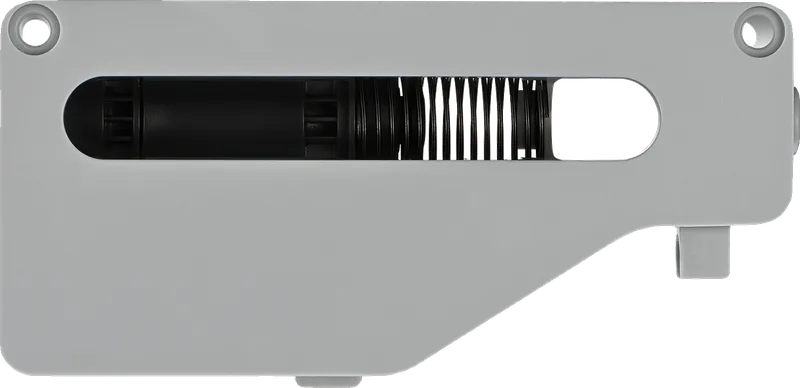
Where the buffer sits, by printer
| Printer | Where the buffer sits | How to get at it |
|---|---|---|
| X1 and P1 series | On the back of the printer, between AMS and toolhead | Two screws (H2.0 hex key), then unplug the 4-pin and 6-pin cables and both PTFE tubes |
| P2S | On the back of the printer | Bambu's buffer cleaning guide: H1.5 hex key, top cover and circuit board off, clear the Y-shaped path |
| X2D | On the back of the printer | Two screws (H2.0 key), as in Bambu's X2D buffer guide |
| H2D, H2C, H2S | Built into the printer; on the H2S in the top cover, with two sliders and two springs | Follow Bambu's H2S buffer guide |
| A1 series with a full AMS | No buffer: the A1 Series AMS Hub takes its place | See Bambu's AMS connection guide |
A stuck buffer falsely reports no filament movement and interrupts the print unnecessarily.
5 Advanced
Less common causes
If steps 1–4 didn't help, expand the topic that matches your situation:
Check and replace PTFE tubes
Kinked PTFE tubes inside the AMS hub cause intermittent detection errors. Pull out each tube and manually thread a short piece of filament through, there should be no noticeable resistance. Replace any kinked sections; they are cheap and easy to swap.
Firmware and AMS compatibility
Check the AMS firmware version, some detection errors were bugs fixed in updates. AMS Lite (A1 series) has a simplified detection system; most steps still apply, but the hub and buffer design differ.
Bypass the AMS and load directly
Load filament directly into the extruder (bypassing the AMS) to check whether the issue is on the AMS side. If the print works without the AMS, the AMS system is faulty. Contact Bambu Lab Support in that case, hall sensor failures sometimes require replacement parts.
Still not working? Interactive troubleshooter, Community
Problem solved!
Bookmark this page for next time.
Tools that fix this
Keep the feed path clean so the AMS reads filament reliably.

Capricorn PTFE Tube XS
Capricorn XS, 1.9 mm ID, for replacing kinked or worn tubes. Narrower than Bambu's stock tubes (2.0 mm inside the AMS and on the X1/P1, 2.5 mm on the A1, A1 mini, A2L, P2S, X2D, H2C, H2D and H2S); Bambu advises against a smaller ID because it adds friction. In our own printers it has still worked better than the stock tube, which is why we keep recommending it; if feeding gets worse, go back to the stock size.
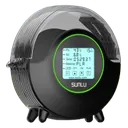
SUNLU FilaDryer S2
Swollen or shedding wet filament fouls the AMS odometer and hub; drying it prevents false runout and feed errors.
Affiliate links. We may earn a small commission at no extra cost to you.
Nothing worked?
Ask in the official Bambu Lab forum or open a ticket via Bambu Lab support; photos help a lot. You can also contact us or post in our community forum. Or try the interactive troubleshooter.