Routine Maintenance Checklist
Weekly, monthly, and quarterly tasks to keep your printer running reliably.
How often should I maintain my Bambu printer?
Weekly: wash the plate with dish soap, inspect nozzle, empty waste bin. Monthly: check the X1/P1 carbon rods (P2S, X2D, H2: clean and oil the X axis) and belts. X1 Lidar: clean the lens when the printer reports a Lidar error, every 3–5 days if you print ABS regularly. Every 2 months: replace the AMS PTFE tubes (monthly with carbon fiber or glow filaments). Every 3 months: grease the Z lead screws (H2D: monthly). These few steps prevent most print failures.
- Title
- Bambu Lab Routine Maintenance Checklist
- Section
- Guides
- Last updated
- Page
- Status
- Not affiliated with Bambu Lab
What you need
- Nozzle Cleaning Kit 22pcs: Needles for the weekly nozzle inspection and for clearing clogs. View on Amazon
- ZDBB Silicone Grease: For the Z lead screws every three months; keep it off the X1/P1 carbon rods. View on Amazon
- Wera Hex-Plus L-Key Set: Ball-end hex keys from 1.5 to 10 mm for the quarterly screw check. View on Amazon
Affiliate links. We may earn a commission at no extra cost to you.
Maintenance schedule at a glance
| Task | Frequency |
|---|---|
| Wash build plate (dish soap) | Weekly and when adhesion drops; IPA wipe between washes |
| Inspect nozzle exterior | Weekly |
| Empty waste bin | Weekly |
| Vacuum chamber | Weekly |
| Check PTFE tubes | Weekly |
| Check extruder gear | Weekly |
| Check carbon rods (X1/P1) | Monthly |
| Clean and oil rails (A1 / A1 mini) | Monthly |
| Clean and oil X axis (P2S / X2D / H2) | Monthly (P2S/X2D: 1 to 3 months by use) |
| Clean Lidar lens (X1 series) | On a Lidar error; every 3–5 days with regular ABS |
| Inspect belts (wear, debris) | Monthly; re-tension when the calibration warns |
| Replace AMS PTFE tubes | Every 2 months (monthly with carbon fiber or glow filaments; the printer reminds you) |
| Grease Z lead screws | Every 3 months (H2D: monthly; P2S/X2D: 3 to 5 months) |
| Full mechanical check | Quarterly |
| Hotend inspection | Quarterly |
| Check AMS wear parts (feeding funnel, support shaft, desiccant) and blow debris out of the hub | When worn or when feeding errors start |
Weekly tasks (10–15 minutes)
Do these every week.
- Clean build plate: Wash with warm water and dish soap whenever adhesion drops and at least weekly; a 90%+ IPA wipe between washes is fine but does not replace the wash. Bambu recommends the wash because alcohol can spread finger oils on the textured plate (Bambu).
- Inspect nozzle: Look for filament buildup or wear on the tip. To clean it, Bambu's X1 guide takes the silicone sock off, heats the nozzle to 200°C and wipes it with tissue, a cloth or tweezers while you wear heat-resistant gloves (Bambu); Bambu's Hotend Cleaning Sponge, used wet, is compatible with nozzles on all its printer models (Bambu). No Bambu guide we found uses a brass brush. If you brush anyway, take the sock off, brush lightly while the nozzle is warm rather than hot, keep the bristles off the heater wires and never use a brush harder than the nozzle (our tools roundup).
- Empty waste bin: Clear purge material from the waste chute before it overflows into the print area.
- Vacuum chamber: Remove loose filament strands and dust from the chamber floor. Debris can get caught in the motion system.
- Check PTFE tubes (AMS): Inspect for kinks, cuts, or debris. A kinked tube causes feed errors that look like sensor problems.
- Check extruder gear: Look for filament dust on the extruder gear and blow or brush it clean when you see any; clogged teeth cause inconsistent extrusion. Bambu: check weekly on the X1, clean when dust shows on the yellow gear on the P1; on the A1 / A1 mini clean the extruder gear every 5 spools, every 2 spools with carbon fiber filaments.
Monthly tasks (30–45 minutes)
- Check carbon rods (X1/P1 series): Look for dust and buildup on the X-axis rods. Clean them with IPA after every 5 kg of ABS/ASA or when ribbing appears, never with oil or grease.
- Clean and oil the rails (A1 / A1 mini): Clean the X linear rail and the Y guide rails (A1 mini also the Z rail) with tweezers and a lint-free cloth, then re-lubricate them with lubricant oil and slide the toolhead or bed back and forth to spread it. Never put grease on the X linear rail (Bambu: A1, A1 mini). Instead of the included oil, Bambu also allows the original WD-40 Multi-Use Product on the X linear rail, the Y guide rails and the Z lead screw of both models; it says it has not tested other oils (Bambu: lubricating the A1 Y axis). Owners are split on this: many point out that WD-40 Multi-Use is largely solvent and leaves only a thin film that dries out, so it needs reapplying more often, and use the included oil, sewing machine oil or a light synthetic oil instead (r/BambuLab, r/3Dprinting).
- Clean and oil the X axis (P2S, X2D, H2 series): Clean the X linear shafts (P2S, X2D) or the X linear rail (H2 series) and apply a thin film of lubricating oil. Intervals: monthly on the H2D, H2S and H2C; on the P2S and X2D monthly at 5 or more print hours a day, every 2 months at 1 to 5 hours, every 3 months below 1 hour, with the Y shafts at the same time (Bambu: H2D, H2S, H2C, P2S, X2D).
- Clean Lidar / camera lens (X1 series, as needed): Bambu sets no monthly interval: clean it when the printer reports a Lidar error or the laser looks abnormal, and every 3–5 days if you print ABS regularly, because ABS particles build up on the lens (Bambu). Gently wipe with a microfiber cloth and a little IPA (a cotton swab helps). Filament dust on the Lidar causes failed first-layer scans.
- Inspect belts: Look for fraying or debris in belt teeth. The printer flags a loose belt during calibration (HMS 0300-1000/1100-0002-0001); then retension as described in the belt tensioning guide.
- Check connectors: Reseat toolhead cable and any connectors that see movement. A loose thermistor connector causes thermal runaway errors.
- Replace AMS PTFE tubes (every two months): The PTFE tubes in the AMS wear from friction during loading and unloading. Bambu: replace them every two months, monthly or whenever wear shows with carbon fiber or glow-in-the-dark filaments; the printer reminds you every two months (Bambu).
- AMS wear parts (as needed): Check the feeding funnel, the active support shaft and the desiccant and replace them when worn; blow debris out of the hub when feeding errors start. Bambu sets no fixed interval for opening the AMS.
Quarterly tasks (1–2 hours)
- Z axis (every three months on X1/P1): Clean the three Z lead screws and apply a thin coat of grease; wipe the Y and Z linear rods with IPA and a little anti-rust oil. No oil or grease on the X1/P1 X-axis carbon rods. Z axis on the newer models: P2S and X2D every 3 to 5 months depending on use; H2S and H2C every three months (Y rods too); H2D every month (Y and Z rods and lead screws; every two weeks if you often print high-temperature or engineering filaments).
- Lead screws (A1 / A1 mini, every three months): Apply lubricant grease to the working area of the Z lead screws (two on the A1, one on the A1 mini) and move the X-axis up and down so the whole working area is coated.
- Full mechanical inspection: Check all visible screws for tightness, bed mounting, gantry, and motion system bolts. Printers vibrate continuously and screws work loose.
- Hotend inspection: Check nozzle for wear, especially if printing abrasive filaments. Replace the hotend when the tip is worn or damaged or extrusion stays inconsistent after cleaning; with CF/GF and particle-filled filaments check the nozzle and extruder gears more often (Bambu).
- Review firmware: Check for updates. Bambu releases updates that fix bugs and improve calibration. Update during a period without urgent prints, updates can change print behavior and may require recalibration.
Oil or grease: what each printer family gets
| Printers | Oil | Grease |
|---|---|---|
| X1, P1 | Y and Z linear rods: IPA wipe, then a little anti-rust oil, every 3 months. Never on the X-axis carbon rods: IPA only, checked monthly | The three Z lead screws, a thin coat every 3 months; never on the carbon rods |
| A1, A1 mini | X linear rail and Y guide rails (A1 mini: also the Z rail), monthly; Bambu also allows the original WD-40 Multi-Use | Z lead screws (A1: two, A1 mini: one) on the working area, every 3 months; never on the X linear rail |
| P2S, X2D | X linear shafts, with the Y shafts: monthly at 5 or more print hours a day, every 2 months at 1 to 5 hours, every 3 months below 1 hour | Z lead screws, every 3 to 5 months depending on use |
| H2D, H2S, H2C | X linear rail, monthly | Z lead screws: H2S and H2C every 3 months; H2D monthly, every 2 weeks if you often print high-temperature or engineering filaments |
H2 series: the Y rods (H2D: Y and Z rods) are due at the same interval as the Z axis. From the monthly and quarterly tasks above; Bambu's model guides are linked there.
A new squeak, click or grinding sound is often the first sign that one of these jobs is due. The printer noise guide matches the sound to the part that usually causes it.
Maintenance kit: what to keep next to the printer
- IPA spray bottle (90%+), refilled from a bottle such as Amazon Basics 99% Isopropyl Alcohol; IPA is flammable, so use it only with the printer off and the hotend and bed cold
- Microfiber cloths, for example the Amazon Basics 24-pack
- Brass brush (optional; Bambu's own nozzle cleaning uses tissue, a cloth, tweezers or its wet cleaning sponge)
- Tweezers
- Compressed air, or a rechargeable electric duster instead of cans, such as the WOLFBOX MegaFlow 50; Bambu's X1 maintenance wiki recommends compressed air for the extruder gear and fans, with the printer off and the fan blades held in place
- Lubricating grease (Z lead screws) and light lubricating oil (linear rods and A1 rails)
- H1.5 and H2.0 hex keys; every Bambu packing list we checked includes both (our tools roundup)
Affiliate links. We may earn a commission at no extra cost to you.
Maintenance is much easier when you don't have to hunt for supplies each time.
Need gear? Our picks, All accessories
Tools for this job
The consumables this maintenance schedule keeps calling for.
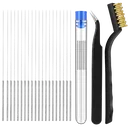
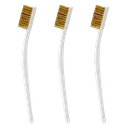
Brass Brush Set
Optional for the weekly nozzle check: no Bambu guide we found uses one. Brush lightly while warm rather than hot, with the sock off and the bristles away from the heater wires.
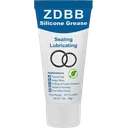
ZDBB Silicone Grease
Silicone grease for the Z lead screws (every three months). Never use it on the carbon rods.
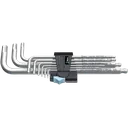
Wera Hex-Plus L-Key Set
Covers every hex screw on the printer for the quarterly full inspection and re-tightening pass.
Affiliate links. We may earn a small commission at no extra cost to you.