Bambu Lab X2D: What It Is, What's New, and Who Should Buy It
Short version
The X2D is a $589 enclosed CoreXY with dual nozzles and an active 65°C chamber. It slots between the P2S ($449) and the H-series, directly replacing the discontinued X1 Carbon in the lineup at $610 less than the X1C's $1,199 launch price. If you were considering the X1C, buy the X2D instead. If the P2S was already enough, it still is.
- Title
- Bambu Lab X2D: Dual Nozzle, Active Chamber, $649
- Section
- News
- Published
- Last updated
- Prices checked
- November 3, 2026
- See also
- Full spec page
- Page
- Status
- Not affiliated with Bambu Lab
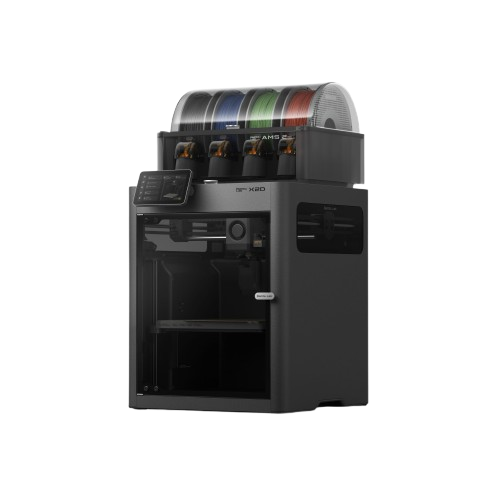
The basics
Bambu Lab announced the X2D on April 14, 2026. It starts at $589 for the base unit and $789 for the Combo, which includes an AMS 2 Pro. In Europe the base model comes in at €629 / £569.
The headline features are an active chamber heater (up to 65°C), a dual-nozzle system with independent extruder types, and a 256 × 256 × 260 mm build volume. Weight is 16.25 kg. The printer uses three-stage filtration: a G3 pre-filter, an H12 HEPA filter, and a coconut-shell activated carbon layer. Noise is rated below 50 dB in Silent Mode.
The dual-nozzle setup, explained properly
The X2D has two separate hot ends with two different extruder configurations, and the distinction matters.
The left nozzle (the primary one you'll use for your main material) uses a direct drive extruder with the motor mounted at the toolhead. This is the faster, more capable of the two: it handles the full material range up to 300°C and runs at higher speeds. The right nozzle uses a Bowden configuration with its motor mounted at the rear of the printer, which is lighter in the toolhead but limits that nozzle's maximum speed to 200 mm/s and narrows its material compatibility.
In practice the right nozzle is designed for support material: PVA or one of Bambu's Support filaments (Support for PLA, PLA/PETG, ABS or PA/PET), materials that don't require high speed or extreme temperatures. Running support from its own nozzle saves flushing between model and support material; Bambu's X2D FAQ credits the dual-extrusion system with faster filament switching and less filament waste. It does not remove the prime tower: the same FAQ says one is still needed when printing with both hotends, to clear residue from the nozzle and stabilize its pressure after a hotend switch. Nozzle switching is handled by a gear-and-trigger mechanism in the toolhead rather than an additional motor, keeping the toolhead mass low.
One thing worth noting: in dual-nozzle mode the build area shrinks from 256 × 256 × 260 mm to 235.5 × 256 × 256mm, because both nozzles need to reach the full print area and the offset between them costs usable X space. For most prints this is irrelevant. If you're printing right at the edge of the build envelope, plan accordingly.
Active chamber: why it matters
The X2D actively heats its enclosure to up to 65°C. This is the same chamber temperature the H-series reaches, and it's meaningfully different from what printers like the P2S or X1C offer. Those machines have passive enclosures that only warm up as a side effect of printing, depending on ambient temperature and how long the print runs (Bambu advertises a 50°C chamber for the P2S). The X2D holds 65°C actively regardless of the room.
What this unlocks is reliable ABS, ASA, and Nylon printing without warping on large parts. A passive chamber in a cold room or an air-conditioned space can drop below the threshold that keeps parts from delaminating. An active chamber removes that variable. It's a genuine engineering improvement, not a spec-sheet number.
The 300°C nozzle limit still applies, but it rules out less than it sounds: Bambu lists PC, PA and carbon- or glass-fiber reinforced PA6, PAHT and PPA for the X2D's main hotend. What stays off the table is PPS and PPS-CF/GF: neither is on the X2D's list, and Bambu's filament guide rates PPS-CF/GF at 310 to 340°C and clears it only for the H2 series and the X1E. For those, the H2S ($1,049 in the Bambu US store, checked November 3, 2026) remains the entry point.
What changed versus the X1 Carbon
The X1C launched in 2022 at $1,199 and was Bambu's flagship until the H-series arrived. The X2D supersedes it at $589 and beats it on almost every hardware spec: active chamber versus passive, dual nozzle versus single, up to 25 AMS colors versus 16 on the X1C, and two AI cameras versus one. The acceleration figure (20,000 mm/s²) is the same on both.
The one thing the X1C retains is its Lidar sensor, which performs first-layer inspection (it scans the finished first layer and warns about defects) and flow calibration. The X2D has no Lidar: it runs Flow Dynamics Calibration on its main nozzle (the auxiliary nozzle is calibrated manually in Bambu Studio), and its Liveview and toolhead cameras handle AI failure detection; Bambu lists no first-layer inspection for it. The Vision Encoder (an optional add-on, not included in the base price) brings 50-micron motion accuracy to the X2D for users who need it. Whether losing Lidar is a meaningful step down in practice depends on your workflow. For the majority of hobby and prosumer use, the gap won't be noticeable.
Where it fits in the lineup
The X2D is priced $140 above the P2S. On Bambu's spec sheet the X2D is the faster machine (1,000 mm/s on its main toolhead vs 600 mm/s for the P2S; since firmware 01.03.00.00 of September 21, 2026 the P2S reaches 1000 mm/s on travel moves only, with Bambu Studio 2.8.3.66 or later), while the P2S keeps single-nozzle simplicity with no dual-nozzle build volume penalty. The X2D has the active chamber, dual nozzle, and 25-color AMS support. For most users who need an enclosed printer, the X2D's feature set is the better buy at $140 more. The P2S still makes sense if the $140 matters more to you than the active chamber and the second nozzle.
At the top end, the H2S ($1,049) adds a 350°C nozzle and a substantially larger 340 × 320 × 340 mm build volume, with the same 1,000 mm/s top speed and 20,000 mm/s² acceleration that Bambu's spec pages list for the X2D. The X2D undercuts it by $460 and is meaningfully lighter (16.25 kg vs 30 kg), which matters if you need to move it.
| Feature | P2S | X2D | X1C | H2S |
|---|---|---|---|---|
| Price | $449 | $589 | $1,199 launch price (discontinued) | $1,049 |
| Chamber heating | Passive (~50°C) | Active (65°C) | Passive | Active (65°C) |
| Dual nozzle | No | Yes (DD + Bowden) (better) | No | No |
| Max nozzle temp | 300°C | 300°C | 300°C | 350°C |
| Max speed (main) | 600 mm/s (1000 mm/s travel since firmware 01.03.00.00) | 1,000 mm/s | 500 mm/s | 1,000 mm/s |
| Lidar | No | No | Yes | No |
| AMS colors (max) | 20 (4 AMS 2 Pro + 4 AMS HT) | 25 (4 AMS 2 Pro + 8 AMS HT + external spool) (better) | 16 (4 AMS units) | 24 (4 AMS 2 Pro + 8 AMS HT) |
| Weight | 14.9 kg | 16.25 kg | 14.13 kg | 30 kg |
Prices: Bambu US store, checked November 3, 2026. X1C: launch price (discontinued), no longer sold new. AMS maximums: Bambu Wiki, Multi-Model AMS Compatibility Guide, checked October 2, 2026.
Is it actually worth buying?
If you were planning to buy an X1C, buy the X2D. You get a better machine for less money. The only real trade-off is Lidar, and that's a meaningful loss only for users who depend on its flow calibration and unattended overnight production. For everyone else, the X2D's Flow Dynamics Calibration and AI cameras cover the practical needs.
If you were looking at the P2S, the decision is tighter. The $140 jump to the X2D buys active chamber heating and a support nozzle, both of which are genuinely useful features. If you print ABS or ASA regularly, or want support material in its own nozzle instead of flushing between materials, it's worth it. If you only print PLA and PETG and don't need any of that, the P2S is still fine.
The Combo at $789 (includes AMS 2 Pro) is the better buy over the base if multi-color or multi-material is on your roadmap. Buying the AMS 2 Pro separately later costs more.