X2D
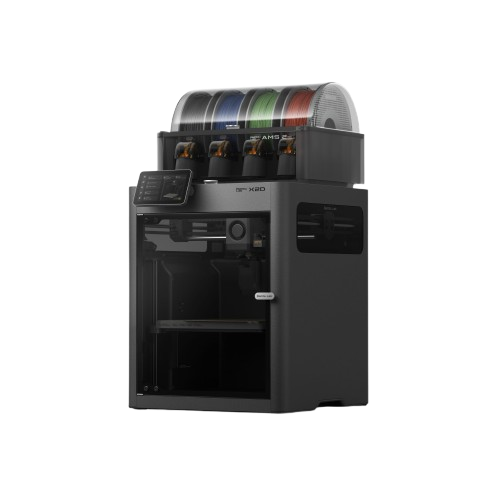
The X1 Carbon's direct successor, launched April 2026. The X2D's headline is a dual-nozzle system: a main direct-drive extruder paired with a dedicated auxiliary nozzle for support material, so switching between model and support material is a nozzle change instead of a flush through one nozzle (a prime tower is still printed). Active 65°C chamber heating and a 25-color AMS ceiling round out a machine that does more than the X1C did, for $610 less than the X1C's $1,199 launch price.
Should I buy the X2D?
Yes. If dual-nozzle multi-material or clean support removal matters to you, the X2D is the only Bambu printer at this price point with a dedicated auxiliary extruder. The active 65°C chamber also makes it genuinely better than the X1C for ABS, ASA, and Nylon. Skip it if you specifically need Lidar quality sensing (no Lidar on X2D; Vision Encoder is an optional add-on) or 350°C engineering temps (step up to the H2S at $1,049).
Links to Amazon are affiliate links. We may earn a commission at no extra cost to you.
Store price and the 90-day low
Official Bambu Lab US store, checked November 3, 2026.
| Configuration | US store price |
|---|---|
| X2D | $589 |
| X2D AMS Combo | $789 |
| 90-day low, X2DOct 27 to Nov 4, 2026 | $589 |
The 90-day low is the lowest price in our daily log of the US store, Aug 7 to Nov 4, 2026.
Black Friday 2026
Bambu lists the X2D Combo at $789 from October 27 to December 1, against a typical price of $899. Our log has had it at $899 every day since October 4.
Full specifications
- Isometric view.
- Source: Bambu spec page bambulab.com/en-us/x2d/specs, checked 2026-10-07
| Build volume (main nozzle) | 256 × 256 × 260 mm (10.1 × 10.1 × 10.2 in) |
|---|---|
| Build volume (dual nozzle) | 235.5 × 256 × 256 mm (9.3 × 10.1 × 10.1 in) |
| Max speed (toolhead) | 1,000 mm/s |
| Acceleration | 20,000 mm/s² |
| Motion system | CoreXY |
| Layer height (0.4 mm nozzle) | 0.08–0.28 mm (Bambu Studio default range) |
| Extruder | Dual: Direct Drive (main) + Auxiliary |
| Nozzle (stock) | 0.4 mm (Quick-Swap compatible) |
| Flow sensing | Real-time (servo extruder) |
| Filament tangle detect | Yes |
| Nozzle max | 300°C |
|---|---|
| Bed max | 120°C |
| Enclosure | Yes |
| Chamber heating | Active (65°C) |
| Air filter | 3-stage: G3 pre-filter + H12 HEPA + carbon |
| Carbon filter | Yes |
| Bed surface | Textured PEI (magnetic) |
|---|---|
| Calibration | Flow Dynamics Calibration (main nozzle); motion accuracy with optional Vision Encoder |
| Lidar sensor | No |
| Vision Encoder | Optional add-on (50-micron accuracy) |
| AI failure detection | Yes: 2 cameras (Liveview + Toolhead) |
| Vibration comp. | Yes |
| AMS | AMS 2 Pro / AMS HT (up to 25 colors) |
| Connectivity | Dual-band Wi-Fi (2.4 + 5 GHz), LAN mode, no Ethernet port |
| Weight | 16.25 kg |
| Power supply | 100–120V or 200–240V AC (regional versions), max 1600W at 220V / 1100W at 110V |
Who should buy the X2D?
Support material and two materialsGood fit
A separate auxiliary nozzle runs a second material, such as support, next to the main nozzle. P2S vs X2D (Bambu X2D FAQ)
ABS, ASA and engineeringGood fit
The chamber is actively heated to 65°C and the bed reaches 120°C, where the P2S chamber is passive. P2S vs X2D
PPS and 350°C materialsLook elsewhere
The hotends top out at 300°C; the H2S reaches 350°C. X2D vs H2S (Bambu X2D FAQ)
Upgrading from the X1 CarbonGood fit
Adds the auxiliary nozzle and a 65°C heated chamber but drops the X1C's Micro Lidar; the optional Vision Encoder compensates belt stretch and drift, it does not replace Lidar. X2D vs X1C (Bambu X2D page)
Known issues
- The auxiliary extruder must stay at or below 200 mm/s and 1,000 mm/s² acceleration; Bambu warns that faster settings can jam the filament. (Bambu X2D FAQ)
- Two-material prints share a common area of 235.5 × 256 × 256 mm, smaller than the main nozzle's 256 × 256 × 260 mm. (Bambu X2D FAQ)
- TPU prints only from the main nozzle; the auxiliary nozzle does not support it. (Bambu X2D TPU guide)
Known issues only from Bambu's own wiki, firmware release notes, FAQ, blog and recall pages, checked October 2, 2026. Specs: our table above and Bambu's spec pages.
Verdict
The X2D is a thoughtful replacement for the X1C. It costs $610 less than the X1C did, and it delivers features the X1C never had: a dedicated auxiliary extruder for support material, active 65°C chamber heating, and a second toolhead camera. For most users, this is a clear upgrade path.
The one genuine compromise versus the X1C: no Lidar. The X2D runs Flow Dynamics Calibration on its main nozzle; the optional Vision Encoder (sold separately, 50-micron accuracy) compensates belt stretch and mechanical drift and does not replace Lidar. Flow calibration stays automatic, only the method differs: instead of printing lines and scanning them with Lidar, the X2D purges filament at the wiper and reads the extrusion force with the eddy current sensor in its toolhead. The X2D's AI camera system (two cameras vs the X1C's one) picks up some of that slack on failure detection.
Where the X2D genuinely surpasses the X1C: multi-material printing and engineering filaments. The auxiliary nozzle changes multi-material work from a compromise (large purge waste) to something that works cleanly. The active 65°C chamber means ABS, ASA, and Nylon are first-class citizens, not afterthoughts. At $589 ($789 Combo), this is one of the better-value enclosed printers in Bambu's lineup.
Pros & Cons
Pros
- Dual nozzle: support material without flushing (prime tower still printed)
- Active 65°C chamber: best ABS/ASA/Nylon in this price tier
- Up to 25-color printing with AMS 2 Pro / AMS HT
- Two AI cameras (Liveview + Toolhead) for better monitoring
- Real-time flow sensing (servo extruder)
- Filament tangle detection
- Quick-Swap nozzle system
- $610 cheaper than X1C was, more features for less
Cons
- No Lidar; the Vision Encoder (motion accuracy) is a separate, optional add-on
- 300°C hotend limit: no PPS (H-series: 350°C)
- Launched April 2026, long-term reliability still TBD
- AMS sold separately in standalone version ($589 base)
- Aux nozzle adds complexity vs single-nozzle maintenance
- H2D ($1,399) still wins for serious dual-extrusion + engineering work
Material compatibility
Filled circle: works well. Half: capable, or only with upgrades. Empty: not recommended.
| Material | Support | Notes |
|---|---|---|
| PLA / PLA+ | Excellent | No active chamber needed. |
| PETG | Excellent | Dual camera monitoring catches stringing or adhesion issues early. |
| ABS / ASA | Excellent | Active 65°C chamber makes this first-class. Better than X1C's passive heat. |
| TPU (flexible) | Supported | Direct drive handles flexible filament well. |
| Nylon / PA | Good | Active 65°C chamber significantly helps vs passive setups. Dry filament essential. |
| PVA / Support filaments | Excellent | On Bambu's list for both hotends. Best use case for the auxiliary nozzle: dedicated support material, clean removal. |
| CF / GF composites | Supported | Stock nozzles are hardened steel; Bambu advises the main hotend for PETG-CF, ASA-CF and PA6-CF. Active chamber helps layer adhesion on CF-PA. |
| PA-CF (PA6, PAHT) | Supported | On Bambu's X2D filament list. Active chamber helps. Dry filament required. |
| PC | Supported | On Bambu's X2D filament list for both hotends. The active 65°C chamber reduces warping. |
| PPA-CF / PPA-GF | Main hotend only | Bambu lists fiber-filled PPA for the main hotend, not the auxiliary one. For PPS, step up to the H-series (350°C). |
Dual nozzle tip: The auxiliary nozzle is designed for support materials (PVA or Bambu's Support filaments). Use it as the dedicated second material in multi-material prints to avoid flushing between model and support material (a prime tower is still printed). The main direct-drive nozzle handles all primary filament colors via AMS.
Setup tips
- Auxiliary nozzle calibration
- Run the dual-nozzle offset calibration before your first multi-material print. The X2D guides you through this in the setup wizard. Get it right once and you won't need to redo it.
- ABS/ASA, active chamber
- Pre-heat the chamber for 10–15 minutes at 65°C before starting. Set bed to 100°C. With active heating, warping risk drops significantly compared to passive-only setups.
- PVA in the aux nozzle
- Store PVA in a dry box and load it only when needed: PVA absorbs moisture quickly and will clog. Run a short prime before starting multi-material prints to ensure flow.
- Vision Encoder (optional, sold separately)
- If you add it, it runs Motion Accuracy Calibration and compensates belt stretch and mechanical drift. It is not a Lidar replacement.
- LAN mode
- Enable LAN Only + Developer Mode in Settings for Orca Slicer. Connect via local IP and access code. Works the same as X1C.
Common questions
X2D or X1 Carbon?
X2D. It's $610 cheaper than the X1C's $1,199 launch price, has dual nozzles, active chamber, and more cameras. The only reason to hunt down an X1C is if you specifically need Lidar-based quality sensing: the X2D has none.
X2D or P2S?
P2S at $449 if you don't need dual extrusion or active chamber heating. X2D at $589 if you want support material printing, ABS/Nylon as a priority, or more AI monitoring. The $140 gap is very worth it for those features.
X2D or H2D?
H2D at $1,399 if you need 350°C (PPS and PPS-CF are on the H2D's filament list, not the X2D's) or the larger build volume (325 × 320 × 325 mm single nozzle); both are rated at 1,000 mm/s. X2D if $589 budget and the 300°C tier materials cover your use case. Both have dual nozzles.
Is the auxiliary nozzle the same as the H2D's second nozzle?
No. Different system. The H2D carries two equal nozzles on one toolhead and switches between them: one extruder servo motor drives a dual extruder, only one nozzle prints at a time, and both nozzles are rated for the same materials. The X2D's auxiliary nozzle is optimized for support material specifically, not dual-equal-filament printing. For pure dual-material work with identical material capability, H2D wins.
Does the X2D work with the AMS 2 Pro?
Yes. Up to 25 colors with AMS 2 Pro and AMS HT units (4 AMS 2 Pro + 8 AMS HT + the external spool). The Combo version ($789) ships with one AMS unit.
No Lidar: is that a dealbreaker?
For most users, no. Lidar on the X1C was primarily useful for first-layer inspection and flow calibration. The X2D runs Flow Dynamics Calibration on its main nozzle, and its Liveview and Toolhead cameras handle AI failure detection. The optional Vision Encoder is a different tool: it compensates belt stretch and mechanical drift for 50-micron motion accuracy. Flow calibration itself stays automatic (eddy current sensor at the purge wiper instead of a Lidar scan of printed lines), so the missing Lidar matters for a minority of use cases.
X2D vs X1 Carbon: what changed
| Feature | X1 Carbon | X2D |
|---|---|---|
| Price (standalone) | $1,199 (former list) | $589 |
| Price (Combo) | No longer sold | $789 |
| Nozzles | 1 | 2 (DD + Aux) (better) |
| Chamber heating | Passive (not actively heated) | Active (65°C) |
| AI cameras | 1 | 2 (Liveview + Toolhead) (better) |
| Flow sensing | No | Yes (servo extruder) (better) |
| Filament tangle detect | No | Yes (better) |
| Max AMS colors | 16 | 25 (better) |
| Build volume (Z) | 256 mm | 260 mm |
| Lidar sensor | Yes | No |
| Calibration system | Lidar-assisted | Flow Dynamics Calibration (main nozzle); motion accuracy with optional Vision Encoder (better) |
The X2D wins on almost every hardware spec. The one X1C advantage: Lidar, which gives it an edge for detecting flow issues and first-layer problems on complex prints. The optional Vision Encoder addresses motion accuracy, not first-layer inspection.
Starter accessories for the X2D
What we would add to a new X2D in the first month.
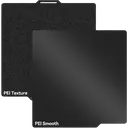
UniTak Double-Sided PEI
Double-sided 257 mm plate compatible with the X2D. Smooth or textured bottom finish from a single plate.
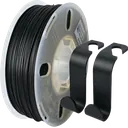
PRILINE Carbon Fiber PC
Carbon-fiber PC (use the PC profile). Bambu's X2D spec sheet lists PC and fiber-filled PA6, PAHT, PPA and PET, but not fiber-filled PC, so test it on the main hotend before relying on it.
Affiliate links. We may earn a commission at no extra cost to you.
Compare this printer
Check Price: $589 / $789 Combo
Links to Amazon are affiliate links. We may earn a commission at no extra cost to you.
Related reading
- Which Bambu Lab Printer Should I Buy?Honest printer recommendations based on what you actually need. Compare A1 mini, A1, P1S, P2S, X2D, H2S and H2D by use...
- OrcaSlicer 2.5 Alpha and RC: H2C and A2L SupportOrcaSlicer 2.5 brings H2C and A2L profiles and mixed nozzle sizes on the H2D and X2D. Alpha, beta and the November 1...
- Bambu Lab Hotend and Nozzle Replacement GuideModel-specific hotend replacement guide for X1 Carbon, P1S, P1P, A1, A1 mini, P2S, X2D, H2D and H2S. Covers tool-free...
- Bambu FCC Filings: H3C, P3C, X2D Pro, S1 ScannerSeven Bambu devices passed the FCC in September 2026: H3C, P3C, X2D Pro, AMS 3H and 3P, the R1 and an S1 3D scanner....
Sources
4 sources, including Bambu Lab product pages and Bambu Lab wiki. Last checked November 3, 2026.
ShowHide
- Bambu Lab US store, X2Dbambulab.com/en-us/x2dStore and Combo prices, checked November 3, 2026
- Bambu Lab X2D tech specsbambulab.com/en-us/x2d/specsSpecifications, checked October 2, 2026
- Bambu Lab Wiki, X2D firmware release historywiki.bambulab.com/.../x2d-firmware-release-historyFirmware version and date, checked November 3, 2026
- BambuHub daily store logbambuhub.net/bambu-price-tracking90-day low, our daily check of the US store
What changed
Newest first, from this page's version history. Only changes to text you can read here; date refreshes and reshuffled reading links are left out.
- Daily price log now includes the Black Friday prices of October 27.
- Bambu US store price update: H2S $1,049 (was $1,199), X2D $589 (was $649), X2D Combo $789 (was $899), H2D $1,399 (was $1,549), P2S $449 (was $549).
- Black Friday 2026: Bambu's sale price for the X2D Combo (October 27 to December 1) against the lowest price in our log.
Earlier changes
13 older entries, Jul 5, 2026 to Oct 8, 2026.
ShowHide
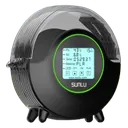
- Dryer tip: SUNLU rates the S2 for 70°C, enough for PLA, PETG and TPU; for the PA and PC blends the page now points to a dryer that reaches 85°C, such as Bambu's AMS HT.
- Spec table: layer height is now 0.08 to 0.28 mm, the Bambu Studio default range for the 0.4 mm nozzle (was 0.05 to 0.35 mm); connectivity is dual-band Wi-Fi plus LAN mode, with no Ethernet port.
- H2D comparison corrected: its two nozzles share one toolhead and one extruder motor, and only one prints at a time (was described as a full second extruder).
- Dual-nozzle notes corrected: Bambu Studio still prints a prime tower after each hotend switch (was described as needing no purge tower).
- Added Who should buy, Known issues and the firmware and price lines; calibration is now Flow Dynamics Calibration on the main nozzle, with the Vision Encoder as an optional add-on. Estimated accessory prices removed.
- Specs checked against Bambu: PC now supported on both hotends (was not supported), dual-nozzle build volume 235.5 × 256 × 256 mm (was 235.5 × 256 × 260 mm), power supply 100 to 120V or 200 to 240V by region.
- Price comparison: the X1C Combo is now marked no longer sold (was $1,449) and the X1C's $1,199 shown as former list price; H2S step-up price $1,199 (was $1,249).
- Specs corrected: max speed 1000 mm/s (was 500 mm/s), bed max 120°C (was 110°C); the H2D comparison now gives 325 × 320 × 325 mm per nozzle (was 350 × 320 × 325 mm).
- Starter accessories: PRILINE Carbon Fiber PC now recommended instead of the carbon fiber PETG.
- H2D price in the comparison notes now $1,549 (was $1,899).
- Spec table: air filter now listed as 3-stage, G3 pre-filter plus H12 HEPA plus carbon (was HEPA filter: Yes).
- Added Starter accessories for the X2D: UniTak double-sided PEI plate, SUNLU FilaDryer S2 and PRILINE carbon fiber PETG.
- Spec table: dual-nozzle build volume now 235.5 × 256 × 260 mm (was 235.5 × 256 × 256 mm).
- Model
- X2D
- Page
- Type
- New: April 2026, Best dual extrusion
- Last updated
- Editor
- BambuHub editorial
- Sources
- Listed above
- Status
- Not affiliated with Bambu Lab