Clogged Nozzle
Follow the steps in order. Most clogs clear by step 2 or 3.
- Title
- Clogged Nozzle Fix Guide for Bambu Lab Printers
- Section
- Troubleshooting
- Page
- Status
- Not affiliated with Bambu Lab
1 Diagnose first
Is it a nozzle clog or an AMS feeding issue?
Both look the same: no filament coming out. Before cleaning the nozzle, isolate the problem.
- Disconnect the AMS from the printer (unplug the PTFE tube at the back of the machine).
- Heat the nozzle to printing temperature for your filament.
- Manually push filament into the extruder from the top.
- If filament flows freely out of the nozzle → AMS was the problem, not the nozzle. See the AMS guide.
- If you feel strong resistance or nothing comes out → you have a nozzle/hotend clog. Continue below.
2 Quickest fix
Purge at 250 °C (290 °C after ABS, ASA, PA or PC)
High temperature softens and pushes out most clogs caused by carbonized residue or a partial blockage.
- On the printer touchscreen, set the nozzle to the flush temperature for the filament last in the hotend: 250 °C for PLA, PETG, TPU or PVA, about 290 °C for ABS, ASA, PA or PC (about 320 °C for PPS or PPA on the H2 series). You find the setting on the X1 series, P2S, X2D and H2 series under Controls → Nozzle & Extruder (or tap the nozzle temperature on the home screen), on the P1 series under Controls → Nozzle Temperature, on the A1, A1 mini and A2L under Control → Nozzle Temperature.
- Once it is at temperature, press Extrude repeatedly and keep extruding for 30–60 seconds.
- Never exceed your printer's maximum nozzle temperature: 300°C on the A1, A1 mini, A2L, P1, X1C, P2S and X2D, 350°C on the H2S, H2D and H2C.
Works best on: PLA residue, PETG carbonization, minor partial blockages.
3 Needle cleaning
Use the cleaning needle
Bambu Lab includes a cleaning needle with every printer. It physically breaks up debris inside the nozzle tip.
- Keep the nozzle at that flush temperature (Bambu's X1/P1 guide uses the pin at 250 °C).
- Insert the needle into the nozzle opening from below, using gentle in-and-out strokes.
- For a 0.4 mm nozzle: use a needle no thicker than 0.35 mm. Using a thicker needle risks damaging the nozzle.
- Skip this step on a 0.2 mm nozzle: Bambu's unclogging guides leave the pin out for 0.2 mm nozzles, and the A1 mini guide says the method does not work on nozzles smaller than 0.4 mm. Go straight to the cold pull (step 4).
- After a few strokes, press Extrude to flush debris out. Repeat 3–5 times.
Caution
Do not use the needle in a cold nozzle. The material must be molten. Never force the needle through hard resistance.4 Most effective
Cold pull (Atomic Pull)
The cold pull physically drags clog debris out of the nozzle. It is the most reliable cleaning method. Repeat 3–5 times until the pulled filament comes out clean with no dark specks.
- Remove the PTFE tube at the top of the extruder by pressing the fitting and pulling the tube out.
- Set nozzle temperature to 250 °C.
- Push a length of PLA or Nylon (best materials for cold pull) into the extruder manually until filament flows from the nozzle tip.
- Lower the temperature to the pull temperature for your material (see table below). Keep pressing Extrude every 2–3 seconds while it cools to maintain pressure.
- At pull temperature: press Retract on the screen and help only lightly by pulling the filament end; do not pull hard against the extruder gears. After a few retract clicks the filament leaves the gears and slides out.
- Inspect the tip: a correct cold pull shows a cone-shaped end (imprint of the nozzle interior). Dark spots or debris = clog material was removed.
- Repeat until the pulled filament tip is clean and translucent.
| PLA | Pull at 70–90 °C |
|---|---|
| PETG | Pull at 100–120 °C |
| ABS / ASA | Pull at 110–130 °C |
| Nylon / PA | Pull at 120–140 °C |
| PC | Pull at 130–150 °C |
Tip: If the filament breaks instead of pulling cleanly → temperature is too low. If it slides out easily without resistance → temperature is still too high. Adjust by ±5 °C. Bambu's own X1/P1 procedure loads PLA at 220 °C and pulls at 100 °C, so start there if the table range does not work for your filament.
- Schematic: 1.75 mm filament with the cone of the nozzle interior.
A1 / A1 mini (Bambu's procedure, PLA example): remove the toolhead front cover, heat the hotend to 100 °C and take it out while hot (oven glove, or heat-resistant gloves with fingers such as Grill Armor gloves), then pull the remaining filament out of its inlet with pliers. Put the hotend back, heat to 220 °C and load another color of the same filament until only the new color comes out. Then lower to 100 °C and do the cold pull. Reconnect the PTFE tube and test extrusion; repeat if it is still clogged.
Affiliate link. We may earn a commission at no extra cost to you.
Guided cold pull: H2S, H2D, H2C, P2S and X2D under Toolbox → Nozzle Cold Pull Maintenance on the touchscreen (H2C: both extruders support it; for a High Flow nozzle use the right extruder); A2L under Settings → Maintenance → Nozzle Cold Pull Maintenance.
5 Replace
Replace the hotend assembly
If multiple cold pulls and needle cleaning haven't cleared the clog, replacement is the fastest and most reliable fix. A replacement hotend costs $9.99 to $17.99 in the Bambu US store (A1/A2 series $9.99 to $11.99, P1 series $14.99 for the bare Hotend or $34.99 as Complete Hotend, H2/P2S/X2D standard flow $17.99; high-flow H2/P2S/X2D hotends $49.99; checked October 18, 2026) and takes 3–5 minutes to swap.
Bambu hotends are integrated assemblies (nozzle + heatblock in one unit), not screw-in nozzles like other brands. You replace the whole assembly, not just the nozzle tip.
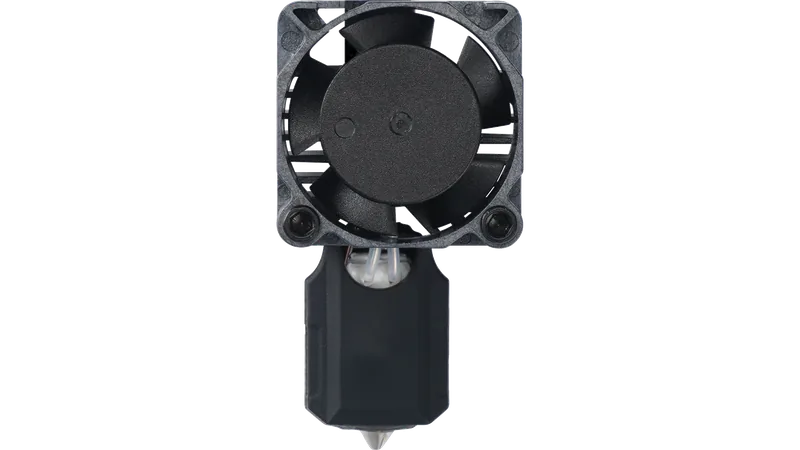
On the X1C, P1S, and P1P, unplug 3 cables (heater, fan, thermistor) and remove 2 screws with an H2.0 hex key. The swap takes 3–5 minutes and works the same way on all three; Bambu sells separate Complete Hotend versions for the X1 and P1 series, so check which one you order (the bare Hotend fits both). This plug-and-two-screw swap needs the Complete Hotend. The cheaper Hotend comes without ceramic heater, thermistor and fan: you move them over from the old hotend with the included thermal grease and retaining clip, as in Bambu's X1/P1 guide. On the A1 and A1 mini, it's a snap-off quick-swap system: no tools needed, under 60 seconds.
The community rule of thumb: if you've spent more than 30 minutes troubleshooting a clog, just replace the hotend. The time saved is worth more than the part cost.
6 Advanced
Less common causes
Heat creep: the hidden clog cause for PLA
Heat creep happens when heat from the print chamber travels up into the heatbreak zone, softening filament before it reaches the melt zone. The result looks like a nozzle clog but is actually a blockage in the heatbreak. Fix: On X1C and P1S, open the front door and/or remove the top glass cover when printing PLA or TPU. The cooler ambient temperature prevents heat creep. This is Bambu's own recommendation.
Filament-specific clog behavior
Silk PLA leaves particularly stubborn residue. After any silk print, flush with 50–100 mm of regular PLA before switching materials.
PETG carbonizes quickly during pauses or failed prints. If you cancel a print, unload immediately before the material burns in the nozzle.
Carbon Fiber / Glass Fiber filaments must never be run through a 0.2 mm nozzle: Bambu rates the clogging risk as extremely high. Use 0.4 mm minimum for Bambu CF filaments, 0.6 mm recommended for all other CF/GF.
TPU jams when retraction is too high. The flexible filament buckles in the heatbreak zone instead of retracting. Keep retraction at the value of Bambu's filament profile and raise it only in 0.2 mm steps if it oozes (Bambu: generally no more than 2 mm), and feed standard TPU (including Bambu's TPU 95A HF) from the external spool or the rear TPU outlet of an AMS HT, not through the AMS feed; only Bambu's TPU for AMS is made to run through the AMS.
How often should I replace the nozzle?
Bambu publishes no hour figures for nozzle life. Replace the nozzle or hotend when the tip is visibly worn or damaged or extrusion stays inconsistent after cleaning and calibration. With CF/GF and particle-filled filaments (such as PLA Glow, Sparkle and Marble) use hardened steel only, since Bambu says stainless steel and brass wear out quickly with them, and check the nozzle and extruder gears more often. Signs of wear: under-extrusion that calibration can't fix, visibly rounded or oval nozzle tip.
Preventing clogs: maintenance schedule
Bambu recommends a preventive cold pull at least once a month, especially when you switch between filament types. Keep the silicone sock fitted, store filament dry and group short jobs into one print, because frequent heat-up and cool-down cycles speed up residue buildup. Check the PTFE tube for discoloration or kinks while the extruder is open for the cold pull. After printing high-temperature filament such as PAHT-CF or PPS, flush the nozzle before going back to PLA, PETG or TPU: see switching from high-temperature filament below.
Nothing worked?
Ask in the official Bambu Lab forum or open a ticket via Bambu Lab support; photos help a lot. You can also contact us or post in our community forum. Or try the interactive troubleshooter.
Nozzle cleared!
Bookmark this page for next time.
Why Bambu nozzles clog, and how to stop the next one
Bambu's troubleshooting guides name five recurring causes. Most clogs come back because one of them is still there after the cleaning.
- Heat-softened filament. PLA and PETG soften in a warm enclosure, and the drive gear squashes them inside the extruder. For these materials, open the door or top cover and lower the bed temperature where you can.
- Filament diameter out of spec. Thick spots from bending or crushing, or thin spots the gear has chewed, jam the path. Bambu suggests checking with calipers: the target is 1.75 ± 0.03 mm. Cut off any section outside that.
- Debris and particles. Dust on the filament, debris inside the extruder and the particles in carbon fiber, glow-in-the-dark or sparkle filaments collect at the nozzle tip. For fiber-filled filaments Bambu recommends a 0.6 or 0.8 mm nozzle and warns that a 0.2 mm nozzle sharply raises the clog risk.
- Too little melt time. Printing too cold, or so fast (Ludicrous mode) that the filament does not fully melt, causes partial clogs. Clear the nozzle, then slow down or raise the temperature slightly. If extrusion never works at the correct temperature, the heater itself may be worn out.
- Leftover filament from a very different material. Switching between PLA and PC or between ASA and TPU without purging the previous filament completely leaves residue behind.
Partial clog or worn extruder gear? Bambu's 220 °C test
A partial clog shows up as under-extrusion (gaps in walls and top layers) or as filament that curls instead of falling straight when you extrude by hand. Bambu notes it can also throw off the Flow Dynamics calibration. To tell a narrowed nozzle from a drive gear problem, heat the nozzle to 220 °C, load PLA and press Extrude:
- Long, smooth strand that drops straight down: the nozzle channel is clear and the drive gear works.
- Short, rough strand: either the channel is narrowed or the drive gear is faulty. Bambu's next step: remove the nozzle retaining screw, heat to 220 °C and push a piece of PLA into the nozzle by hand. If it flows smoothly, the nozzle is fine; open the extruder and check the gear for wear or debris, then clean or replace it.
Switching back from high-temperature filament
After PAHT-CF, PET-CF, PPA-CF, PPA-GF, PPS or PPS-CF, Bambu flushes the nozzle this way before printing PLA, PETG or TPU:
- Set the nozzle to 250–300 °C and unload the high-temperature filament by hand.
- Load the new low-temperature filament and extrude until it has pushed the old material out.
- Lower the nozzle to 220–240 °C and keep extruding while it cools, until the new filament flows smoothly.
If it still will not extrude, raise the temperature again and use the cleaning needle. With fiber-filled filaments, particles build up inside the nozzle over time, so plan regular cold pulls rather than waiting for a full clog.
Clog in the middle of a print
Pause or cancel the job before you start any of the steps above: Bambu's P2S guide says not to begin nozzle maintenance while a print is still running. Pressure behind a clog can make molten filament spray out when it releases, so wear heat-resistant gloves and keep your face away from the nozzle.
Bambu's unclogging guide for your printer
Bambu keeps one guide per model, with photos of each step: X1 / P1, A1 / A1 mini, P2S, X2D, H2D, H2S, H2C, A2L.
Sources
10 sources, including Bambu Lab wiki and Bambu Lab product pages. Last checked October 4, 2026.
ShowHide
- Bambu Lab Wiki, How to Avoid Nozzle Clogs (updated 2026-08-27)
- Bambu Lab Wiki, 3D Printer Clog (updated 2026-08-24)
- Bambu Lab Wiki, Filament Guide Material Table (updated 2026-09-24)
- Bambu Lab Wiki, Nozzle/Hotend Unclogging Procedure for X1/P1 (updated 2026-09-30)
- Bambu Lab Wiki, P2S Nozzle Unclogging Procedure (updated 2026-09-30)
- Bambu Lab Wiki, TPU Printing Guide (updated 2026-09-17)
- Bambu Lab Wiki, X2D Nozzle Unclogging Procedure (updated 2026-09-30)
- Bambu Lab Wiki, H2C Nozzle Cold Pull Maintenance and Cleaning (updated 2026-01-19)
- Bambu Lab Wiki, Cold Pull Maintenance Guide for the A2L (updated 2026-09-15)
- maximum nozzle temperatures from Bambu's tech specs for the P2S and H2S (checked October 4, 2026)
Tools that fix this
The gear that clears a clog fastest.
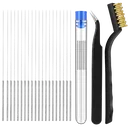
Nozzle Cleaning Kit
Includes the sub-0.35 mm needles and drill bits you need to physically break up debris inside the nozzle tip.
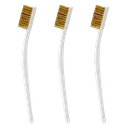
Brass Brush Set
Optional for carbonized residue on the nozzle exterior; no Bambu guide we found uses one. Brush lightly while warm rather than hot, with the sock off and the bristles away from the heater wires.
E3D ObXidian 0.6mm (P1P/P1S)
Hardened 0.6mm high-flow replacement nozzle for the P1P and P1S, for when cleaning fails and the tip is worn or permanently blocked.
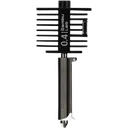
Bambu Hotend A1/A2, hardened steel
The A1 counterpart: on the A1, A1 mini and A2L the nozzle and heatsink are one part, so a worn or permanently blocked tip means a new hotend. Bambu's own hardened steel version also handles abrasive CF and GF filaments.
Affiliate links. We may earn a small commission at no extra cost to you.
Clog-related HMS codes
If Bambu Handy or Bambu Studio shows one of these HMS codes, it maps to the problem on this page. Each code links to Bambu's official step-by-step fix; come back here if the official steps don't solve it.
HMS_0700-2000-0002-0009– Failed to extrude, extruder may be clogged, official fixHMS_0700-7000-0002-0001– Failed to pull filament out, clogged extruder likely, official fixHMS_1200-2000-0002-0006– AMS lite (A series): failed to extrude, possible clog, official fixHMS_0300-0200-0001-0008– Nozzle cannot reach target temperature, official fix