X1 Carbon
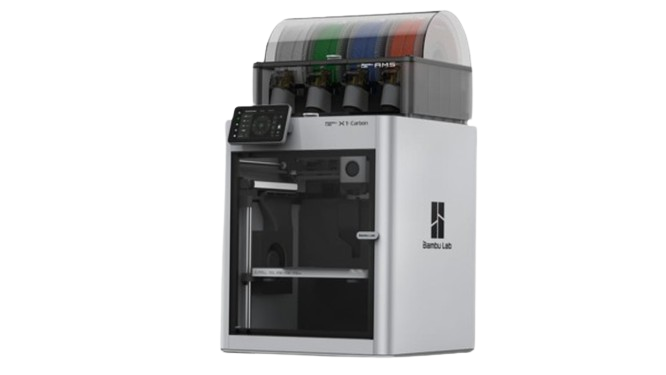
The printer that put Bambu on the map. Lidar first-layer scanning, AI spaghetti detection, full enclosure and a 300°C hotend. Discontinued March 2026, its successor is the X2D ($589), which adds a dual nozzle and active chamber for far less money.
Caution
Discontinued March 2026Bambu ended the X1 Carbon (and the whole X1 series) on 31 March 2026. It is no longer sold new. The successor is the X2D ($589), which adds a dual nozzle and active 65°C chamber for far less than the X1C cost.
Should I buy the X1 Carbon?
The X1 Carbon is discontinued. If you specifically want Lidar-based quality sensing, look for a used unit. For a new machine, the X2D ($589) is the direct successor and beats it on most specs; the P2S ($449) is sufficient for most printing, and the H2S ($1,049) gets you a larger volume and active chamber.
Price
Not sold new by Bambu any more. Launch price $1,199
checked November 3, 2026
Firmware
Discontinued, still patched by Bambu. Latest firmware 01.12.00.00 (August 4, 2026)
Full specifications
- Isometric view.
- Source: Bambu spec page public-cdn.bambulab.com/…/bambulab-X1-carbon-tech-specs.pdf, checked 2026-10-07
| Build volume | 256 × 256 × 256 mm (10.1 × 10.1 × 10.1 in) |
|---|---|
| Max speed | 500 mm/s |
| Acceleration | 20,000 mm/s² |
| Motion system | CoreXY |
| Layer height (0.4 mm nozzle) | 0.08–0.28 mm (Bambu Studio default range) |
| Extruder | Direct drive |
| Nozzle (stock) | 0.4mm |
| Nozzle max | 300°C |
|---|---|
| Bed max | 110°C at 220V, 120°C at 110V |
| Enclosure | Yes |
| Chamber heating | Passive (not actively heated) |
| Air filter | Activated carbon (no HEPA) |
| Carbon filter | Yes |
| Bed surface | Textured PEI (magnetic) |
|---|---|
| Lidar sensor | Yes |
| AI failure detection | Yes (spaghetti detection) |
| Auto leveling | Yes (Lidar-assisted) |
| Vibration comp. | Yes (accelerometer) |
| Flow calibration | Yes (Lidar) |
| Camera | Yes (included) |
| AMS | AMS compatible (up to 4 units, 16 colors) |
| Connectivity | Wi-Fi 2.4GHz, Bambu-Bus, LAN mode |
| Machine dimensions | 389 × 389 × 457 mm |
| Weight | 14.13 kg |
| Power supply | 100–240V AC, max 1000W at 220V / 350W at 110V |
| Status | Discontinued (March 2026) |
Who should buy the X1 Carbon?
Buying newLook elsewhere
Bambu ended the X1 series on March 31, 2026; the X2D is its successor. X2D vs X1C (Bambu blog)
Lidar first-layer checksDepends
The X1C has Micro Lidar, which the X2D and P2S do not; worth it on a used unit only if you rely on it. X2D vs X1C
ABS and ASADepends
Enclosed, but the chamber is not actively heated; the X2D and H2S heat theirs to 65°C. X1C vs H2S
Known issues
- Discontinued March 31, 2026: Bambu promises firmware bug fixes and feature updates until May 31, 2027, security patches until May 31, 2029 and spare parts until March 31, 2031. (Bambu blog)
- Bambu Studio keeps the print height at 250 mm and blocks an 18 × 28 mm area in the front left corner for the filament cutter by default; the full 256 mm cube needs a stopper change and works only without the AMS. (Bambu wiki)
Known issues only from Bambu's own wiki, firmware release notes, FAQ, blog and recall pages, checked October 2, 2026. Specs: our table above and Bambu's spec pages.
Verdict
The X1 Carbon launched Bambu's reputation and remained capable right up to its discontinuation in March 2026: the Lidar first-layer calibration and AI failure detection were features you didn't find elsewhere in the P-series. At its $1,199 launch price it always sat awkwardly, though: the P2S at $449 produces comparable quality for most prints, and the H2S, which launched at $1,249 in August 2025 and now sells for $1,049, delivers better specs for about the same money (larger volume, faster speed, higher temp, active chamber).
Its differentiator was Lidar-based quality control: genuinely useful for complex multi-layer engineering parts or high-value multi-color models where catching failures early saves material and time. Now that it is discontinued, the X2D ($589) is the direct successor: it drops Lidar but adds a dual nozzle, active 65°C chamber, and a second AI camera for $610 less than the X1C's $1,199 launch price. Buy a new X1C only if you find one at a genuine clearance price and specifically want its Lidar.
Pros & Cons
Pros
- Micro Lidar for first-layer inspection (no current Bambu printer carries one on the printer itself)
- AI spaghetti/failure detection
- Fully sealed enclosure with activated carbon
- AMS up to 16 colors
- Camera and remote monitoring included
- Proven, long-standing platform with excellent support
Cons
- Discontinued March 2026. No longer sold new
- Successor X2D ($589) beats it on most specs for less
- $1,199 list price was hard to justify vs P2S ($449) for most prints
- H2S ($1,049) has more specs than the X1C had at its $1,199 list price
- 300°C hotend cap (X1E: 320°C, H-series: 350°C)
- Passive chamber only, no active heating
- Same 256mm build volume as much cheaper printers
- AMS sold separately in standalone version
Material compatibility
Filled circle: works well. Half: capable, or only with upgrades. Empty: not recommended.
| Material | Support | Notes |
|---|---|---|
| PLA / PLA+ | Excellent | Lidar calibration makes already good PLA prints even better. |
| PETG | Excellent | Lidar catches any first-layer adhesion issues early. |
| ABS / ASA | Excellent | Sealed enclosure with passive heating handles these well. |
| TPU | Supported | Works. Flexible filament handled well by direct drive. |
| PA / PA6-GF | Supported | Bambu rates PA and fiber-filled PA ideal on the X1C. Dry filament essential. |
| CF composites | Supported | Stock nozzle and extruder gears are hardened steel; Bambu rates CF/GF-filled filament ideal. |
| PC | Supported | Bambu rates PC ideal on the X1C. No active chamber heating; the X1E adds it (up to 60°C). |
| PPA-CF / PPA-GF | Compatible | Bambu's filament guide recommends PPA-CF/GF for enclosed printers including the X1 series. Use the hardened nozzle and dry filament. |
| PPS / PPS-CF | Not recommended | Bambu's filament guide clears PPS-CF/GF only for the H2 series and X1E and recommends a 310 to 340°C nozzle, above the X1C's 300°C. Bambu's older X1E comparison page still rates the X1C 'Compatible'. For regular PPS work, an H-series printer is the current option. |
Setup tips
- Lidar calibration
- Let the X1C run its full first-layer Lidar scan on every print. It adds 2–3 minutes but catches bed offset issues before you waste filament on a failed run.
- ABS/ASA
- Pre-heat the chamber for 15–20 minutes before starting. Set bed to 100°C and let the sealed enclosure warm up. The passive chamber is effective once pre-heated.
- LAN mode
- Enable LAN Only + Developer Mode in Settings for Orca Slicer. Connect via local IP and access code.
Common questions
X1C or P2S?
P2S at $449 if you want the best value enclosed printer. The X1C listed at $1,199 ($750 more) and is discontinued, so today it means a used unit; pick one only if Lidar quality sensing and AI failure detection matter to you.
X1C or H2S?
The H2S ($1,049 in the Bambu US store) costs $150 less than the X1C's former $1,199 list price and gets you 1,000 mm/s, 350°C, active 65°C chamber, and a larger build volume. Choose X1C only if you specifically need Lidar quality sensing.
Does Lidar really matter?
For most prints: you won't notice. For long, complex prints with fine features: you will. It's insurance more than a daily benefit, but when it catches a failure at layer 1 instead of hour 6, it pays for itself.
AMS with the X1C?
Yes, the full AMS (not AMS Lite). Up to 16 colors. AMS is included in some combo packs or sold separately.
Compare this printer
Related reading
- Bambu Lab Routine Maintenance ChecklistWeekly, monthly, and quarterly maintenance routine for Bambu Lab printers. Keep your X1C, P1S, P2S, A1, or H2S running...
- Bambu X1 Firmware After 237 Days: What Is In ItThe discontinued X1 series got firmware again on August 4. Security fixes, purge chute detection, farm-mode plate...
- Does Your Bambu Filter the Air? Carbon ExplainedSix Bambu models ship an H12 HEPA stage: the X1E, X2D and H2 series. The P1S and X1C use activated carbon only, which...
- Bambu H2D Bed Adhesion: Why Corners LiftYour H2D lifts a corner but the same file prints fine on your X1C? It comes down to uneven bed temperature. The real...
Sources
3 sources, including Bambu Lab product pages and Bambu Lab wiki. Last checked November 3, 2026.
ShowHide
- Bambu Lab X1 Carbon tech specs (PDF)public-cdn.bambulab.com/.../bambulab-X1-carbon-tech-specs.pdfSpecifications, checked October 2, 2026
- Bambu Lab Wiki, X1 / X1C firmware release historywiki.bambulab.com/.../X1-X1C-firmware-release-historyFirmware version and date, checked November 3, 2026
- BambuHub price trackerbambuhub.net/bambu-price-trackingPrice history, our daily US store check
What changed
Newest first, from this page's version history. Only changes to text you can read here; date refreshes and reshuffled reading links are left out.
- Bambu US store price update: X2D $589 (was $649), P2S $449 (was $549), H2S $1,049 (was $1,199).
- Spec table: layer height is now 0.08 to 0.28 mm, the Bambu Studio default range for the 0.4 mm nozzle (was 0.05 to 0.35 mm); the claim of best Bambu print quality at the 300°C tier is removed.
- Added Who should buy and Known issues with Bambu's support dates (firmware updates until May 31, 2027, spare parts until Mar 31, 2031), plus the firmware and price lines; PPS now rated not recommended (was compatible).
Earlier changes
6 older entries, Jul 5, 2026 to Oct 1, 2026.
ShowHide
- Material table: Bambu's filament guide lists PPS-CF/GF only for the H2 series and X1E at 310 to 340°C, above the X1C's 300°C.
- Specs checked against Bambu: weight 14.13 kg (was about 17.8 kg), chamber passive and not actively heated (was about 45°C typical); PC, PA and CF filament now rated supported, as Bambu rates them (PC was not supported).
- H2S comparison corrected: at $1,199 the H2S costs the same as the X1C's former list price (was "$50 more"); buying an X1C today means a used unit.
- H2S price in the comparisons now $1,199 (was $1,249).
- Filter spec corrected: activated carbon only, no HEPA (was listed as HEPA plus carbon).
- Marked discontinued: Bambu ended the X1 series on Mar 31; the verdict now points new buyers to the successor X2D ($649) and to a used unit only for Lidar.
- Model
- X1 Carbon
- Page
- Type
- Discontinued
- Last updated
- Editor
- BambuHub editorial
- Sources
- Listed above
- Status
- Not affiliated with Bambu Lab