Carbon Rod Care & Cleaning
Keep X-axis motion smooth and precise. For X1C, P1S and P1P owners; the P2S, X2D and H2 series use oiled linear shafts or rails instead.
How do I clean the carbon rods?
Wet the rods with IPA (or ethanol), move the print head along them while wet, then wipe with a microfiber cloth; repeat until the cloth stays clean. Never use oil or grease on the carbon rods. Check them monthly and clean after every 5 kg of ABS/ASA or when ribbing appears, not before every print.
- Title
- Bambu Lab Carbon Rod Care and Cleaning Guide
- Section
- Guides
- Last updated
- Page
- Status
- Not affiliated with Bambu Lab
Cleaning quick reference
| Do | Don't |
|---|---|
| IPA or ethanol + microfiber cloth | Oil or grease |
| Move the print head along the wet rods | Cleaning before every print |
| Inspect bearings | Compressed air into bearings |
| Monthly check, clean every 5 kg ABS/ASA | Paper towels (leave fibers) |
Which printers have carbon rods?
| Printer | Carbon rods? |
|---|---|
| X1 Carbon | Yes, X axis only |
| P1S | Yes, X axis only |
| P1P | Yes, X axis only |
| P2S / X2D | No, oiled linear shafts |
| H2S / H2D / H2C | No, X linear rail + Y linear rods (oiled) |
| A1 | No, different system |
| A1 mini | No, different system |
A1 / A1 mini owners: your printers use oiled linear rails (clean and oil monthly, never grease on the X rail); see the A1 rail care in the routine maintenance guide.
Why carbon rods need regular care
Bambu's X1C, P1S, and P1P use carbon fiber rods on the X axis (Y and Z run on 8 mm linear rods with LMU8 bearings), key to their speed and precision. Carbon fiber has unique maintenance requirements:
- ABS and ASA residue: Bambu says volatile substances from these filaments settle on the rods and raise their resistance, which is why its cleaning interval counts kilograms of ABS/ASA rather than hours
- Dust accumulation: The slightly textured surface traps fine dust and filament particles
- Oil sensitivity: Carbon rods don't need lubrication and shouldn't have it, unlike steel rails
- Static charge: Carbon fiber can build up static, attracting more dust
- Bearing wear: The linear bearings need clean rod surfaces to run smoothly
Cleaning routine (Bambu method)
- Power off the printer and unplug it, since you move the toolhead by hand
- Loosen the four belt-tensioner screws at the back (do not remove them) so the head moves freely
- Press on the belts next to the toolhead: the tensioners should move. If they do not, find out why before you go on, because the belts need equal tension
- Wet the X-axis rods with IPA (Bambu lists 70% isopropyl alcohol, or ethanol) by spray or a soaked microfiber cloth, and move the print head along the full length while they are wet, so the alcohol also gets into the bearings
- Wipe with a microfiber cloth; repeat about three times. The job is done when a white cloth picks up no more black stains; after a lot of ABS/ASA, wipe with a bit more pressure. The toolhead also sounds different once rods and bearings are clean
- Move the head 10 to 20 times along the dry rods
- Center the head, retighten the tensioner screws without overtightening, then run calibration. If you moved the printer, put it in its final spot first, so the calibration matches where it will print
Use lint-free microfiber cloth only. Paper towels leave fibers behind that create more problems than they solve.
Our picks for this job: Amazon Basics microfiber cloths (24 pack) and Amazon Basics 99% Isopropyl Alcohol. IPA is flammable: keep the printer off and unplugged, as in step 1, with the hotend and bed cold.
Affiliate links. We may earn a commission at no extra cost to you.
Bearing inspection
If you hear grinding, scraping, or feel resistance when moving the toolhead by hand, the bearings may need attention:
- Inspect the bearing blocks for visible debris caught at the entry/exit points
- Use tweezers to remove any filament strands caught in the bearing
- If a bearing is rough after cleaning, it may need replacement, contact Bambu support
Signs that cleaning is overdue
- Grinding or rough feeling when moving toolhead by hand (power off first)
- Layer shifting that appears randomly
- Ringing/ghosting getting worse over time
- Visible dark buildup on the rod surface near the bearing blocks
- Round parts print as ovals: Bambu lists this as a symptom of abnormal X-axis resistance
- The printer reports
HMS_0300-1000-0002-0002(X-axis resonance frequency differs greatly from the last calibration): clean the rods, re-tension the belts and rerun the machine calibration HMS_0300-2000-0001-0001(X-axis homing abnormal): Bambu says to check whether the toolhead is stuck or the carbon rods have too much resistance
A little play in the bearings is normal. Bambu says tighter tolerances would make the bearings bind on the rods.
What about PTFE spray, soap or other lubricants?
Some owners put dry PTFE lube or soap on the rods. Bambu's guides name only IPA or ethanol for cleaning and rule out oil and grease on the X1 and P1 carbon rods; grease, Bambu says, causes abnormal resistance and makes the rods hard to clean. Dry lubes and soap are not mentioned at all, so they are untested by Bambu. The bearings are self-lubricating: Bambu warns that cleaning before every print wipes off the film that forms on the rods, and the printer then works with a stored calibration value that no longer matches the real resistance. Clean when the interval or a symptom says so, not more often.
Cleaning did not help: replace the rod assembly
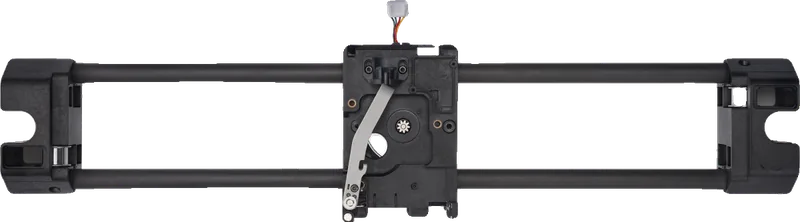
If the resistance stays abnormal after a thorough cleaning, or the idlers in the X-axis assembly make noise, Bambu's fix is the X-axis carbon rods assembly as one part: two Y sliders, the toolhead carriage with extruder motor and cutter lever, and the two carbon rods. It is the same part for the X1 and P1 series. The swap needs H1.5 and H2.0 hex keys, a slotted screwdriver (or flat tweezers) and needle nose pliers, and the side and rear panels come off, so follow Bambu's step-by-step guide or ask Bambu support first.
Monthly: full rod inspection
- Move the toolhead through its full range of motion, feeling for any rough spots
- Inspect the full length of all rods for wear marks or damage
- Check that all rod mounting screws are still tight (don't overtighten)
- Run Vibration Compensation calibration to verify motion quality is good