P1S
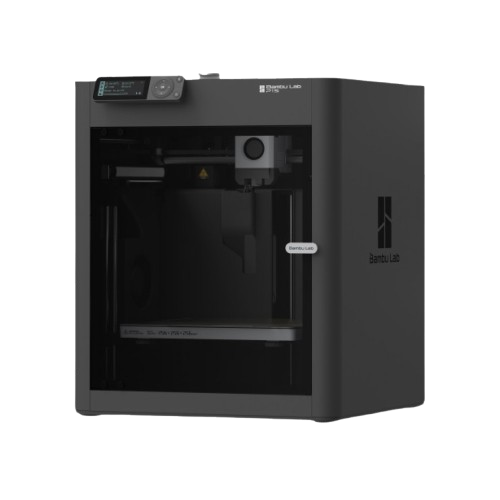
Fully enclosed, sealed, with activated carbon filtration. The P1S is where Bambu's lineup gets serious about engineering materials: Bambu rates ABS and ASA as ideal in the enclosure, PA and PC as capable.
Should I buy the P1S?
At $349: yes, it is the cheapest enclosed Bambu, $100 under the P2S. The P2S ($449) is newer and faster; the P1S is the cheaper way in. If $100 does not matter to you, the P2S is the better machine.
Links to Amazon are affiliate links. We may earn a commission at no extra cost to you.
Store price and the 90-day low
Official Bambu Lab US store, checked November 3, 2026.
| Configuration | US store price |
|---|---|
| P1S | $349 |
| P1S AMS Combo | $479 |
| 90-day low, P1SOct 27 to Nov 6, 2026 | $349 |
The 90-day low is the lowest price in our daily log of the US store, Aug 9 to Nov 6, 2026.
Black Friday 2026
Bambu lists the P1S AMS 2 Pro Combo at $509 from October 27 to December 1, against a typical price of $579. Our log has had it at $579 every day since October 4, and the Fall Sale did not cut it either.
Full specifications
| Build volume | 256 × 256 × 256 mm (10.1 × 10.1 × 10.1 in) |
|---|---|
| Max speed | 500 mm/s |
| Acceleration | 20,000 mm/s² |
| Motion system | CoreXY |
| Layer height (0.4 mm nozzle) | 0.08–0.28 mm (Bambu Studio default range) |
| Extruder | Direct drive |
| Nozzle (stock) | 0.4mm |
| Nozzle max | 300°C |
|---|---|
| Bed max | 100°C |
| Enclosure | Yes |
| Chamber heating | Passive, not heated (chamber regulator fan) |
| Air filter | Activated carbon (no HEPA) |
| Carbon filter | Yes |
- The optional AMS is drawn in phantom lines. Bambu lists it at 368 × 283 × 224 mm without naming the axes; we drew 224 mm as its height.
- (682 mm), 26.9 in, is a reference dimension: our sum of 458 and 224 mm, not a Bambu figure.
- Bambu publishes neither the height with the lid open nor a recommended clearance for the P1S.
- Only the outer outline is to scale; the door, screen and dial lines are schematic.
| Bed surface | Textured PEI (magnetic) |
|---|---|
| Auto leveling | Yes |
| Vibration comp. | Yes |
| Camera | Yes (included) |
| AMS | AMS compatible (up to 4 units, 16 colors) |
| Display | 2.7" LCD (button controls) |
| Connectivity | Wi-Fi 2.4GHz, Bluetooth, Bambu-Bus, LAN mode |
| Machine dimensions | 389 × 389 × 458 mm |
| Weight | 12.95 kg |
| Power supply | 100–240V AC, max 1000W at 220V / 350W at 110V |
Who should buy the P1S?
ABS and ASAGood fit
The enclosure and the 100°C bed make ABS and ASA practical; the chamber is passive, not actively heated. P1S vs P2S
Carbon and glass fiberDepends
Bambu says to fit a hardened steel hotend and extruder gear before printing fiber-reinforced filament on the P1S; the P2S ships with a hardened steel nozzle. P1S vs P2S (Bambu P1 FAQ)
MulticolorGood fit
Full AMS support, up to 16 colors. A1 vs P1S
Upgrading from the A1Good fit
Same 256 × 256 × 256 mm build volume, plus an enclosure for ABS and ASA, which Bambu rates as not recommended on the A1. A1 vs P1S (Bambu A1 specs)
Known issues
- Fiber-filled filament: Bambu advises against carbon or glass fiber on the stock hotend until a hardened steel hotend and a hardened steel extruder gear are fitted. (Bambu P1 FAQ)
- Bambu Studio keeps the print height at 250 mm and blocks an 18 × 28 mm area in the front left corner for the filament cutter by default; the full 256 mm cube needs a stopper change and works only without the AMS. (Bambu wiki)
- Printers on firmware below 01.09.01.00 must first install the 01.09.01.00 bridge firmware by offline update before any newer version. (Bambu release notes)
Known issues only from Bambu's own wiki, firmware release notes, FAQ, blog and recall pages, checked October 2, 2026. Specs: our table above and Bambu's spec pages.
Verdict
The P1S is a solid machine that established Bambu's credibility in the enclosed-printer market. The fully sealed enclosure, combined with the 100°C bed, makes ABS and ASA genuinely reliable. Bambu rates PA and PC as capable and advises against fiber-filled filament on the stock stainless nozzle. The camera is included, so you can monitor prints remotely.
The honest math changed in 2026: the P1S sells for $349, well under the $699 it launched at, which makes it $100 cheaper than the P2S instead of $150 more expensive. The P2S ($449) is still the better machine, faster at 600 mm/s with an improved motion system. But at current prices the P1S is the budget pick, not the overpriced one.
Pros & Cons
Pros
- Fully sealed enclosure: reliable ABS/ASA printing
- Activated carbon filter against odors and fumes (no HEPA stage)
- 100°C bed: enough for ABS and ASA
- AMS compatible, up to 16 colors
- Camera included for remote monitoring
- Proven, well-documented platform
- Large community and third-party support
Cons
- You want the newer machine: the P2S ($449) is faster, but $100 more at current prices
- Stock stainless nozzle: no fiber-filled filament without a hardened upgrade; PA and PC only rated capable
- Passive chamber only, no active heating
- 500 mm/s max (P2S does 600 mm/s)
- No Lidar first-layer scanning
- AMS sold separately (from $199)
Material compatibility
Filled circle: works well. Half: capable, or only with upgrades. Empty: not recommended.
| Material | Support | Notes |
|---|---|---|
| PLA / PLA+ | Excellent | Works perfectly. |
| PETG | Excellent | Use glue stick on PEI. Seal chamber first for best results. |
| ABS | Excellent | Enclosure makes this reliable. Pre-heat chamber for 15 min. |
| ASA | Excellent | ASA is actually easier than ABS. Great results. |
| TPU | Supported | Direct drive handles TPU well. |
| PA / PA6 | Capable | Bambu's rating for PA on the P1S. Needs dry filament and a pre-heated chamber. Glass-filled PA-GF also needs a hardened nozzle. |
| PLA-CF / PETG-CF | Not recommended (stock) | Bambu advises against fiber-filled filament on the P1S until extruder and hotend are upgraded to hardened parts. |
| PC (Polycarbonate) | Capable | Bambu's rating for the P1S. No active chamber heating; an actively heated chamber (X2D, H2S) reduces warping on large PC parts. |
| PA-CF (high-temp) | Not recommended | Fiber-filled, so Bambu advises against it on the stock nozzle. Use a printer with a hardened nozzle (P2S, X2D, H2S); an active chamber helps. |
Setup tips
- ABS/ASA pre-heat
- Before starting a print, heat the bed to 100°C and let the chamber reach temperature for 15–20 minutes. This prevents corner lifting dramatically.
- LAN mode
- Enable LAN Only + Developer Mode in Settings for Orca Slicer. Use the local IP and access code.
- Filter maintenance
- Replace the activated carbon filter periodically. Bambu recommends every 3 months with regular use. Clogged filters reduce effectiveness.
Common questions
P1S or P2S?
P2S if the $100 difference does not matter to you: it is the newer machine and faster (600 vs 500 mm/s). The P1S is the cheaper one, $349 vs $449 in the Bambu US store (checked November 3, 2026), which makes it the budget pick and the P2S the performance pick.
P1S or X1C?
The X1C added Lidar first-layer scanning and AI failure detection, but it is discontinued; its successor is the X2D at $589. If print consistency on long, complex jobs matters, the X2D is the upgrade to consider. Otherwise the P1S (or P2S) is sufficient.
Does the AMS work with the P1S?
Yes, the full AMS (not AMS Lite). Up to 4 AMS units, 16 colors per print. AMS is sold separately ($199 for the original AMS, $229 for the AMS 2 Pro in the Bambu US store, sale prices against typical prices of $249 and $299, checked October 29, 2026); in a combo it adds $130 (P1S AMS Combo $479) or $160 (P1S AMS 2 Pro Combo $509).
Is the passive chamber enough for PA?
Bambu rates PA as capable (not ideal) on the P1S, so plain PA works with dry filament and a pre-heated chamber. Glass- and carbon-filled grades are not recommended on the stock stainless nozzle; for PA-CF, a printer with a hardened nozzle and an actively heated chamber (X2D, H2S) is the better fit.
Starter accessories for the P1S
What we would add to a new P1S in the first month.
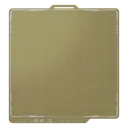
BIQU PEI Sheet
Same 257 mm format as the stock P1S plate at a lower price. A spare plate means back-to-back prints.
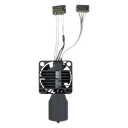
E3D ObXidian 0.6mm High Flow
Drop-in hardened high-flow nozzle for the P1S. Higher throughput, and it survives abrasive CF filament.

Capricorn PTFE Tube XS
Capricorn XS, 1.9 mm ID. Bambu specifies 2.0 mm ID tubes for the P1S and inside the AMS units and advises against a smaller ID because it adds friction. In our own printers it has still worked better than the stock tube, which is why we keep recommending it; if feeding gets worse, go back to the stock size.
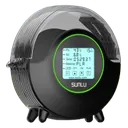
Affiliate links. We may earn a commission at no extra cost to you.
Compare this printer
Links to Amazon are affiliate links. We may earn a commission at no extra cost to you.
Related reading
- Which Bambu Lab Printer Should I Buy?Honest printer recommendations based on what you actually need. Compare A1 mini, A1, P1S, P2S, X2D, H2S and H2D by use...
- Bambu Lab Routine Maintenance ChecklistWeekly, monthly, and quarterly maintenance routine for Bambu Lab printers. Keep your X1C, P1S, P2S, A1, or H2S running...
- Bambu Lab Hotend and Nozzle Replacement GuideModel-specific hotend replacement guide for X1 Carbon, P1S, P1P, A1, A1 mini, P2S, X2D, H2D and H2S. Covers tool-free...
- Bambu Lab Carbon Rod Care and Cleaning GuideHow to clean and maintain X-axis carbon fiber rods on X1 Carbon, P1S, and P1P printers. Bambu's IPA method, how often...
Sources
4 sources, including Bambu Lab product pages and Bambu Lab wiki. Last checked November 3, 2026.
ShowHide
- Bambu Lab US store, P1Sbambulab.com/en-us/p1Store and Combo prices, checked November 3, 2026
- Bambu Lab P1S tech specs (PDF)store.bblcdn.com/.../bambu-lab-P1S-tech-specs.pdfSpecifications, checked October 2, 2026
- Bambu Lab Wiki, P1P / P1S firmware release historywiki.bambulab.com/.../p1p-firmware-release-historyFirmware version and date, checked November 3, 2026
- BambuHub daily store logbambuhub.net/bambu-price-tracking90-day low, our daily check of the US store
What changed
Newest first, from this page's version history. Only changes to text you can read here; date refreshes and reshuffled reading links are left out.
- FAQ: the AMS ($199, was $249) and the AMS 2 Pro ($229, was $299) are at their Black Friday prices in Bambu's US store, checked Oct 29.
- FAQ: the P1S AMS 2 Pro Combo is at its Black Friday price of $509 (was $579), so as a combo the AMS 2 Pro adds $160 over the P1S, checked Oct 28.
- Daily price log now includes the Black Friday prices of October 27.
Earlier changes
16 older entries, Jul 8, 2026 to Oct 27, 2026.
ShowHide
- Bambu US store price update: P1S $349 (was $399), P2S $449 (was $549), X2D $589 (was $649), P1S Combo $479 (was $549).
- Black Friday 2026: Bambu's sale price for the P1S AMS 2 Pro Combo (October 27 to December 1) against the lowest price in our log.
- Store price back at $399 after the $369 cut, checked Oct 9; the gap to the P2S is $150 again.
- Dryer note corrected: SUNLU rates the FilaDryer S2 for 70°C, enough for PLA, PETG and TPU, nylon only with long runs.
- Store price $369, checked Oct 6, shown next to Bambu's typical price of $399; spec table: layer height 0.08 to 0.28 mm for the 0.4 mm nozzle (was 0.05 to 0.35 mm), connectivity adds Bluetooth and Bambu-Bus.
- PTFE tube note: Bambu specifies 2.0 mm ID tubes and advises against smaller ones; we now say why we still recommend the 1.9 mm Capricorn XS.
- Added Who should buy, Known issues (Bambu sources only) and the firmware and price lines; AMS price corrected to $249 for the original AMS and $299 for the AMS 2 Pro (was "$300+"). Estimated accessory prices removed.
- Specs checked against Bambu: bed max 100°C (was 110°C), weight 12.95 kg (was about 16.2 kg), chamber passive and not heated; PA and PC now rated capable, as Bambu rates them.
- P1S or P2S answer rewritten: the P1S is the budget pick at $399 vs $549 (checked Sep 29), the P2S the faster performance pick (was "P2S every time for new buyers").
- Store price back at $399 after the $359 Fall Sale price; the gap to the P2S is $150 again.
- Store price now $359 in Bambu's Fall Sale (list $399); the gap to the P2S is $190.
- Store price back at $399 after the $369 cut; the gap to the P2S is $150 again.
- Store price now $369 (was $399); the gap to the P2S is $180.
- Filter spec corrected: activated carbon only, no HEPA (was listed as HEPA plus carbon).
- Store price $399, shown against the $699 list price; the verdict changed from "probably not" to yes, as the cheapest enclosed Bambu, $150 under the P2S.
- Added starter accessories (spare PEI plate, hardened 0.6 mm nozzle, PTFE tube, filament dryer); display corrected to a 2.7" LCD with button controls (was touch); the X1C answer now points to the X2D at $649.
- Model
- P1S
- Page
- Type
- ABS/ASA capable
- Last updated
- Editor
- BambuHub editorial
- Sources
- Listed above
- Status
- Not affiliated with Bambu Lab