P2S
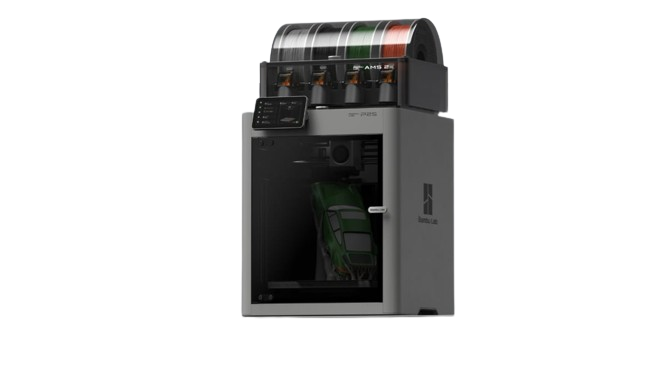
The P1S successor Bambu didn't have to make better, but did. Same build volume and a fully enclosed, passive (not actively heated) chamber, now with 600 mm/s, at $449 in Bambu's US store. The default answer to "I want a Bambu that prints ABS" alongside the P1S ($349, the budget route).
Should I buy the P2S?
Yes, if you want a fully enclosed machine that handles ABS and ASA and sets itself up, and you need neither a second nozzle nor a heated chamber. Better than the P1S, but $100 more ($449 vs $349), so the P1S stays the budget pick. For $140 more ($589), the X2D adds an auxiliary nozzle and active 65°C chamber heating, which is why our P2S vs X2D comparison picks the X2D for most people.
Owners in Bambu's forum report three recurring problems: extruder overload errors, vertical streaks (VFA) on some units, and chamber heat or cold drafts with PLA. Bambu has answered each with firmware or a wiki guide, but none is fixed for every owner. Details and sources: What P2S owners report.
Links to Amazon are affiliate links. We may earn a commission at no extra cost to you.
Store price and the 90-day low
Official Bambu Lab US store, checked November 3, 2026.
| Configuration | US store price |
|---|---|
| P2S | $449 |
| P2S Combo | $649 |
| 90-day low, P2SOct 27 to Nov 6, 2026 | $449 |
The 90-day low is the lowest price in our daily log of the US store, Aug 9 to Nov 6, 2026.
Black Friday 2026
Bambu lists the P2S Combo at $649 from October 27 to December 1, against a typical price of $749. Our log has had it at $749 every day since October 4.
Full specifications
- Isometric view.
- Source: Bambu spec page bambulab.com/en-us/p2s/specs, checked 2026-10-07
| Build volume | 256 × 256 × 256 mm (10.1 × 10.1 × 10.1 in) |
|---|---|
| Max speed | 600 mm/s |
| Acceleration | 20,000 mm/s² |
| Motion system | CoreXY (updated) |
| Layer height (0.4 mm nozzle) | 0.08–0.28 mm (Bambu Studio default range) |
| Extruder | Direct drive (updated) |
| Nozzle (stock) | 0.4mm |
| Nozzle max | 300°C |
|---|---|
| Bed max | 110°C |
| Enclosure | Yes |
| Chamber heating | Passive, about 50°C (Bambu's figure, not actively heated) |
| Air filter | Activated carbon, no HEPA stage (Bambu still lists particulate filtration as supported) |
| Carbon filter | Yes |
| Bed surface | Textured PEI (magnetic) |
|---|---|
| Auto leveling | Yes |
| Vibration comp. | Yes |
| Flow calibration | Yes (automatic) |
| Camera | Yes (included) |
| AMS | AMS, AMS 2 Pro, AMS HT (up to 20 slots) |
| Display | Touch LCD |
| Connectivity | Dual-band Wi-Fi (2.4 + 5 GHz), LAN mode, no Ethernet port |
| Machine dimensions | 392 × 406 × 478 mm |
| Weight | 14.9 kg |
| Power supply | 100–120V or 200–240V AC (regional versions), max 1200W at 220V / 1000W at 110V |
| Status | Current (Oct 2025) |
Who should buy the P2S?
ABS, ASA and CF compositesGood fit
Bambu lists ABS, ASA, PC and carbon-filled nylons such as PA6-CF and PPA-CF for the P2S, printed through the stock hardened steel nozzle. P1S vs P2S (Bambu P2S FAQ)
MulticolorGood fit
Up to four AMS 2 Pro plus four AMS HT units, 20 slots in total. P2S vs X2D (Bambu wiki)
PPS and 350°C materialsLook elsewhere
The hotend tops out at 300°C and the chamber is not actively heated; the H2S adds a 350°C hotend and a 65°C heated chamber. P2S vs H2S (Bambu P2S FAQ)
Upgrading from the P1SDepends
Faster (600 mm/s vs 500 mm/s) with a hardened steel nozzle and the same 256 × 256 × 256 mm build volume; Bambu says a P1S cannot be converted into a P2S. P1S vs P2S (Bambu P2S FAQ)
Known issues
- Firmware 01.03.00.00 adds E3D High-Flow hotend support and 1000 mm/s travel moves, but both need Bambu Studio 2.8.3.66 or later; the first public release that qualifies is 2.9.1 from November 3, 2026. (Bambu release notes, Bambu Studio releases)
- No Ethernet port: Bambu's FAQ says the P2S does not support a wired network connection. (Bambu P2S FAQ)
- No active chamber heating: Bambu regulates the chamber through the closed chassis and by switching between internal and external air circulation. (Bambu P2S FAQ)
Known issues only from Bambu's own wiki, firmware release notes, FAQ, blog and recall pages, checked October 2, 2026. Specs: our table above and Bambu's spec pages. What owners and reviewers report: What P2S owners report.
Verdict
The P2S is a better P1S, but not a cheaper one: at $449 it costs $100 more than the P1S ($349 in the Bambu US store, checked November 3, 2026), which keeps the P1S as the budget pick. The 600 mm/s top speed is a genuine improvement, you'll print at 200–300 mm/s with Bambu's 0.20 mm Standard profile on the standard-flow hotend (outer wall 200, inner walls 300, sparse infill 270 mm/s, per Bambu Studio's profile file), but the headroom is there. Like the P1S, the chamber is enclosed but not actively heated.
The P2S takes up to four AMS 2 Pro plus four AMS HT units at once (20 slots), against four units on the P1S. Bambu's own filament list for the P2S includes PC and carbon-filled nylons (PA6-CF, PAHT-CF, PPA-CF), printed through the stock hardened steel nozzle. For PPS, or a 350°C hotend with active chamber heating, you need the H2S. For PLA, PETG, ABS, ASA, and CF composites, the P2S covers everything needed.
Pros & Cons
Pros
- Best price-to-capability in Bambu's enclosed lineup
- 600 mm/s, meaningfully faster than P1S
- Passive ~50°C chamber: reliable ABS/ASA
- activated carbon filtration included
- Up to 8 AMS units (4 AMS 2 Pro + 4 AMS HT, 20 slots)
- Camera included for remote monitoring
- 110°C bed: handles engineering materials
- Full auto-calibration suite
Cons
- 300°C hotend: no PPS (the H-series goes to 350°C)
- Passive chamber only (vs active 65°C in H2S)
- Same 256mm volume as cheaper A1
- No Lidar first-layer scanning
- AMS 2 Pro sold separately ($229 in the Bambu US store)
- Cloud-dependent by default (LAN+Dev mode workaround)
Material compatibility
Filled circle: works well. Half: capable, or only with upgrades. Empty: not recommended.
| Material | Support | Notes |
|---|---|---|
| PLA / PLA+ | Supported | The P2S FAQ says PLA prints with the door closed while the room stays below 30°C; Bambu's general filament guide still recommends opening the door or top glass for PLA on a bed above 45°C. Some owners still report heat creep or lifted corners; see chamber heat and drafts. |
| PETG | Supported | Use glue on PEI to prevent over-adhesion. For PETG-only prints, Bambu's warping guide suggests its printable air deflector. |
| ABS | Supported | Bambu puts the passive chamber at about 50°C; Tom's Hardware printed ABS without issues. Let it pre-heat. |
| ASA | Supported | Prints in heating mode like ABS: the chamber air recirculates through the carbon filter. |
| TPU (85A–95A) | Supported | On Bambu's P2S filament list; the extruder is direct drive. |
| PLA-CF / PETG-CF | Supported | On Bambu's P2S filament list. The stock nozzle is hardened steel, no swap needed. |
| ABS-GF / ASA-CF | Supported | On Bambu's P2S filament list. Stock hardened nozzle + enclosure. |
| PA / PA6-GF | Supported | On Bambu's P2S filament list. Dry filament required; without active chamber heating, large parts warp more easily. |
| PC | Supported | On Bambu's P2S filament list. No active chamber heating; the H2S's heated chamber reduces warping on large PC parts. |
| PA-CF / PPA-CF | Supported | Bambu lists PA6-CF, PAHT-CF and PPA-CF for the P2S. Dry filament required. |
Setup tips
- ABS/ASA pre-heat
- Heat the bed to 100°C and let the closed chamber warm up for about 15 minutes before a large part. Bambu puts the passive chamber at about 50°C, and CNC Kitchen saw around 50°C or more with the bed at 100 to 110°C.
- PLA cooling
- When the filament profile's softening temperature is 50°C or lower, the P2S pulls room air into the chamber (cooling mode), and the P2S FAQ says PLA then prints with the door closed while the room stays below 30°C. Bambu's general filament guide is more cautious: for PLA on a bed above 45°C it recommends opening the front door or removing the top glass, more so in a warm room. If the chamber runs too hot or corners lift, see What P2S owners report.
- Which AMS
- The original AMS (from P1S/X1C) also works with the P2S via the P2S filament buffer; the AMS Hub does not. If buying new, the AMS 2 Pro adds drying.
- LAN mode
- Enable LAN Only + Developer Mode in Settings for Orca Slicer.
Common questions
P2S or P1S?
P2S if you want the newest enclosed Bambu: it is faster (600 vs 500 mm/s) and better in every spec that differs. But the P1S costs $349, $100 less than the P2S ($449), which makes the P1S the budget pick and the P2S the performance pick.
P2S or A1?
A1 ($259) if you only print PLA/PETG and want to spend less. P2S ($449) if you want ABS/ASA capability, an enclosure with carbon filtering, or 600 mm/s speed.
P2S or H2S?
P2S covers PLA through ABS/ASA and, on Bambu's own filament list, PC and carbon-filled nylons (PA6-CF, PAHT-CF, PPA-CF) as well. H2S ($1,049) if you want a 350°C hotend and an active 65°C chamber for the most demanding grades (among current models, only the H-series lists PPS).
Does the original AMS work with the P2S?
Yes. Bambu sells the original AMS with a P2S configuration; a standalone P2S needs the P2S filament buffer (included in the Combo). The AMS 2 Pro adds filament drying.
What P2S owners report
BambuHub does not run a P2S, so nothing in this section is our own test. It collects owner reports from Bambu's official forum and findings of independent reviewers, each with a link, next to Bambu's own answers. Collected on October 8, 2026, when 01.03.00.00 was the newest firmware. Most forum posts do not name a firmware version; where we add one the owner did not name, it is the public release at the date of the post.
Short verdict
A capable printer with three recurring complaints
Tom's Hardware gave it an Editor's Choice award, and forum owners with thousands of hours on several units describe routine maintenance and little else. Three problems keep coming back in the forum: extruder overload errors, VFA streaks on some units, and chamber heat or cold drafts with PLA. Check a new unit for them in the first weeks, while a return is still easy.
- posts in the main extruder overload thread
- 260
- posts in the VFA thread
- 184
- hours on three P2S of one owner who sees few of these issues
- ~15k
Bambu forum, October 8, 2026. Owners with trouble post, owners without trouble rarely do, as several of them point out.
Reported strengths
- About 15 minutes from box to first print, calibration done by the printer (How-To Geek)
- PLA with the door closed and no clogs, chamber measured at about 33°C (Tom's Hardware)
- Very few failed prints in three weeks of near-constant printing (TechRadar)
- Clog and grinding detection stops a print before it turns into a mess (TechRadar)
- Three P2S at about 2,500 hours each on PETG-HF, routine maintenance only (forum owner)
Reported weaknesses
- Extruder overload errors, often on PETG or several hours into PLA jobs
- VFA streaks on some units, worse along one axis
- Unfiltered exhaust air in cooling mode, the mode PLA uses (CNC Kitchen, How-To Geek, Thomas Sanladerer)
- About 1,000 W at print start on 120 V, enough to overload a 600 W UPS
- Pauses with cardboard spools (TechRadar)
- Support often ships parts to fit yourself instead of a new printer
Extruder motor overload
The error pauses the print. Bambu switched the detection on with the launch firmware 01.01.00.00 (October 14, 2025), and the first forum report followed six days later. Bambu support told another owner that an error two to three hours into a print points to heat creepHeat travels up from the hotend, the filament softens too early and jams in the extruder gears.; he stopped seeing it with the door open and the top glass off. How-To Geek's reviewer had the extruder motor fail twice, while a friend of his runs about 50 P2S without a single problem.
Firmware 01.02.00.00 (April 9, 2026) changed the extrusion strategy to prevent overload in certain situations, and fewer new reports appear in the main thread since. They have not stopped: one owner hits the error on 01.02.00.00 with Bambu PETG Basic in the stock profile while PLA prints cleanly. Going back to 01.01.03.00 fixed it for another owner in May 2026, while others say a downgrade changed nothing. A new nozzle or hotend, or a replacement filament buffer from support, fixed it for single owners, though an owner whose 21 P2S started showing the error at about 450 hours says a new nozzle helps only for a while.
Before you open the extruder
Work through Bambu's troubleshooting guide (February 2026) in order: hotend clamp and the three heating-assembly screws, warped corners, extruder and nozzle clogs (cold pulls, see our clogged nozzle guide), then max volumetric speed. A value meant for the high-flow hotend triggers the error on the standard one: in Bambu Studio's P2S profile, Bambu PLA Basic defaults to 21 mm³/s on standard flow and 40 mm³/s on high flow (the guide's example gives 25 and 35). Lower it for third-party filament, and do not mix the settings of Bambu PETG Basic and PETG HF. The guide also names heat creep in rooms above 30°C; the P2S FAQ gives 10 to 30°C as the operating range.
VFA: vertical streaks on walls
VFAVertical fine artifacts: fine, evenly spaced vertical lines on walls, caused by resonance in the motors and belts. shows most on large flat walls, and not every unit has it. CNC Kitchen's launch-day review saw VFA-like patterns on X-direction faces, most visible at 60 mm/s and largely gone at 80 mm/s; Thomas Sanladerer found them much worse in one travel direction. Bambu's fix in firmware 01.01.01.00 (December 8, 2025) only takes effect after the motor noise-cancellation calibration. Beta testers saw clearly fewer streaks, other owners little or no change, and one saw more after an update. A forum regular with three P2S wrote in April 2026 that updates had mostly solved it; CNC Kitchen's X2D review that month still credited the X2D with better belts and fewer VFA than the P2S.
Retensioning and lubricating the belts did not help the owner who opened the main forum thread. Bambu's belt method is to loosen the four rear tension screws one to two turns, move the toolhead, tighten them again and run the vibration compensation; a forum moderator warns that belts that are too tight make VFA worse. Step by step: our belt tensioning guide.
Chamber heat, cold drafts and the auxiliary fan
The P2S has no exhaust fan. An airflow unit in the right side panel has two modes: in cooling mode the auxiliary fan pulls room air in and warm air leaves through vents in the back panel; in heating mode the chamber air recirculates through the carbon filter. Bambu's start G-code picks cooling mode for a softening temperature of 50°C or lower in the filament profile, and heating mode above that or for a target chamber temperature of 40°C or more.
Too hot for some. One owner logged up to 46°C with PLA, door closed, in a 25°C room. Bambu support told him to open the door and remove the top cover for PLA and to keep the profile's softening temperature at 50°C or below. His replacement printer stays at 34 to 36°C on a nine-hour PLA print, and the owner with about 15,000 hours sees around 40°C only on very long prints, without visible effect.
Too cold for others. In a cold room the intake air lifted the corners of PLA parts for Nicolò Andronio (owner blog). Bambu's warping guide (August 2026) confirms the effect and suggests brim ears, no cooling for the first three layers, and about 20 to 30 percent less auxiliary fan or a setting of 40 to 50 percent. For PLA its printable air deflector stays in the lower position, so the cold air reaches the part, which according to the guide also reduces nozzle clogs.
The fan setting. One owner set 10 percent in the filament profile and found the fan at 40 percent about 20 minutes into a PLA print. Another, who read the G-code, concludes that the slicer value is only a minimum that chamber auto-cooling raises as the chamber warms; Bambu's start G-code does turn on chamber auto-cooling in cooling mode. Others see it differently: one says 0 percent means automatic, not off, and that 10 percent holds for the whole print; another says the setting only drives the optional left fan. Bambu has not documented which setting drives which fan. The optional left fan gets mostly positive replies in a forum thread from August 2026 (less warping on lifted corners), though Bambu support told one owner it does not solve chamber heat.
For the unfiltered exhaust air, Bambu offers an External Exhaust Fan Kit, and since firmware 01.02.00.00 the printer supports the third-party VentoBox filter (both in the fit table). Background: 3D printer air quality.
Startup power and UPS units
Bambu rates the P2S at up to 1,000 W on 110 V (1,200 W on 220 V) and says it holds maximum power for about three to five minutes while the bed heats. On 120 V one owner measured about 1,000 W at print start, against about 375 W for the P1S it replaced, enough to overload his 600 W UPS and make the room lights flicker. Firmware 01.02.00.00 added a Low-Power Mode that heats the bed more slowly. It cut his peak to 790 W, still too much for a 650 W UPS, and added less than a minute to a 15-minute print; another owner can start his P2S on his UPS again. Bambu designed the mode for limited power supplies, so turn it on for a UPS or a weak circuit. Size a UPS above that peak or leave the printer off it, and a forum moderator advises not to start two printers at the same time.
Updates and support
Updates brought new problems for some owners, though not every fault after an update was the firmware's doing:
- 01.01.01.00 (December 2025): several owners report weaker flow and rougher top surfaces with Bambu filament; support found no under-extrusion in one case.
- December 2025 to February 2026: after updates the heatbed stopped heating for several owners (HMS 0300-0100-0001-0008). Rolling back helped some; two owners fixed it with a new MC board.
- 01.01.03.00 (February 2026): one printer read 0°C at the hotend; the cause was a faulty TH board, not the firmware.
- 01.02.00.00 (April 2026): a few owners lost Wi-Fi or live view. A Bambu Studio update the same month, not the firmware, left nozzles hot after the print until Bambu Studio 2.6.0.51 fixed it within days.
- 01.03.00.00 (September 2026): one owner's first layer printed too low until he downgraded.
The 01.01.01.00 notes require the motor noise-cancellation calibration after updating to that version from older firmware or rolling back from it, and after 01.02.00.00 a forum moderator recommended a full recalibration. LAN-only owners wait longer: Bambu says offline installers go through a separate release process, and the offline file for 01.02.00.00 came 12 days after the online update. Every P2S release with dates: firmware tracker.
When hardware fails, support usually ships parts to fit yourself (fan, MC board, TH board, heatbed, filament buffer, extruder) before it offers a new printer; one owner whose printer died after 20 hours was printing again after 33 days. There are good cases too: the owner who logged 46°C got his replacement printer in about two weeks and says everything went smoothly.
Feedback from an owner we know: they ran ABS, ASA and PETG on a P2S over two weeks of daily use. Their summary matches our reviews card: faster than the P1S and the performance pick, while the P1S stays the budget pick.
Fit and settings on the P2S
Everything in this table comes from Bambu's wiki, FAQ and firmware notes.
| Part | What Bambu says |
|---|---|
| Build plates | All current 256 mm Bambu plates. Older plates without a QR code are not recognized: tap Resolved on the screen (the P2S FAQ calls the button Ignore) or turn plate detection off. |
| AMS units | AMS 2 Pro, AMS HT and the first AMS (through the P2S filament buffer), up to 20 slots. AMS lite (A-series only) and the AMS Hub do not work. |
| Filament buffer | Included in the Combo. A standalone P2S needs it for any AMS. Of its two 6-pin ports, only one connects AMS units; the other is a spare for accessories. |
| Drying through the printer | One AMS 2 Pro over the 6-pin cable. Powered by the printer, it dries only in standby: the P2S cannot heat or move while it dries. With Bambu's 24 V, 4 A (96 W) adapter, that limit goes away, and since firmware 01.02.00.00 the AMS 2 Pro dries while the P2S prints. More AMS 2 Pro units each need that adapter; the AMS HT always runs on its own included power cable. |
| Nozzles and hotends | H2D-type nozzles. A1 nozzles do not fit, and the silicone socks fit neither A1 nor H2D. Spare hotend in the US store: $17.99 standard flow, $49.99 high flow. |
| Auxiliary Part Cooling Fan (Left) | P2S only, 12 W. Needs firmware 01.01.00.00 and Bambu Studio 2.3.0.70 or later. The first batch shipped with screws that are slightly too long. Sold in the Bambu US store. |
| External Exhaust Fan Kit | Supported. Needs firmware 01.01.01.00 and Bambu Studio 2.4.1.80 or later; a standalone P2S also needs the filament buffer. |
| Air deflector (printable) | Shorter part only. Mounts at the outlet in the right side panel; raised position for PETG-only prints, lowered for PLA. |
| VentoBox filter (third party) | Supported since 01.02.00.00. Bambu calls it an unofficial modification without Bambu support. |
Alternatives if the reports put you off
P1S
The older design at $349, $100 less. Slower, but its carbon filter sits on an active exhaust fan (How-To Geek). P1S vs P2S
X2D
The X2D costs $140 more at $589 and adds an active 65°C chamber, HEPA and carbon filter, and in CNC Kitchen's view better belts with fewer VFA. P2S vs X2D
H2S
The H2S costs $1,049 and adds a 350°C hotend and an active 65°C chamber, for PPS and large engineering parts. P2S vs H2S
Image: Bambu Lab.
Outside Bambu, the closest rival is Elegoo's Centauri Carbon 2: P1S/P2S vs Centauri Carbon 2.
Owner FAQ
Is the extruder overload error on the P2S common? It is the most discussed P2S problem in Bambu's forum. Bambu lists a hotend clamp that is not closed, clogs, warped parts, heat creep in rooms above 30°C and a max volumetric speed meant for the high-flow hotend as causes, and firmware 01.02.00.00 changed the extrusion strategy against it. Owners still report the error after that update, though fewer new reports appear in the main thread.
Sources. All checked October 8, 2026. Forum links point to the post cited.
Bambu Lab: P2S firmware release history, Extruder motor overload guide (announced by Bambu staff), P2S FAQ, P2S cooling fan system, Preventing warping on P2S/X2D, Auxiliary part cooling fan (left), External exhaust fan kit, P2S belt tension, Multi-AMS compatibility guide, AMS 2 Pro and AMS HT drying function, Build plate overview, Filament guide and material table, Bambu PLA Basic P2S profile in Bambu Studio, P2S specs, P2S start G-code in Bambu Studio, Bambu Studio issue 10235
Reviews: Tom's Hardware (Denise Bertacchi, October 2025), CNC Kitchen P2S review (October 2025), CNC Kitchen X2D review (April 2026), TechRadar (Alastair Jennings, October 2025), How-To Geek (Patrick Campanale, April 2026), Thomas Sanladerer, toms3d.org, Nicolò Andronio (owner blog, February 2026)
Extruder overload: first report, support on heat creep, buffer replaced, 21 printers, 450 hours, downgrade fixed it, PETG Basic on 01.02.00.00
VFA: main thread, beta tester, little change, more VFA after update, mostly solved, moderator on tight belts
Chamber and fans: 70-hour report, 15,000 hours, 2,500 hours each, support advice, support follow-up, replacement unit, 0 percent means auto, 10 becomes 40 percent, slicer value is a minimum, left fan setting, left fan experiences
Power: first report, moderator advice, Low-Power Mode measured, back on the UPS
Updates and support: flow after 01.01.01.00, heatbed after update, new MC board, TH board, nozzles not cooling, Wi-Fi after 01.02.00.00, offline release process, offline file released, recalibration, first layer on 01.03.00.00, printer died after 20 hours, running after 33 days, replacement in two weeks
Starter accessories for the P2S
What we would add to a new P2S in the first month.

BIQU PEI Sheet
Textured 257 mm PEI plate (PyroGrip) that fits the P2S. Keep a spare so a cooling plate never blocks the print queue. BIQU says to turn off build plate detection on the P2S; if you want to keep it on, Bambu's own Textured PEI Plate is the simpler spare. PyroGrip vs CryoGrip

Capricorn PTFE Tube XS
Capricorn XS, 1.9 mm ID. Bambu specifies 2.5 mm ID tubes for the P2S (2.0 mm inside the AMS units) and advises against a smaller ID because it adds friction. On our own Bambu printers (we do not run a P2S) it has still worked better than the stock tube, which is why we keep recommending it; if feeding gets worse, go back to the stock size.
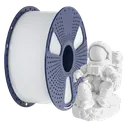
SUNLU PETG
Cheap, consistent PETG for functional parts. We print it on our own Bambu printers, not on a P2S.
Affiliate links. We may earn a commission at no extra cost to you.
Compare this printer
Links to Amazon are affiliate links. We may earn a commission at no extra cost to you.
Related reading
- Which Bambu Lab Printer Should I Buy?Honest printer recommendations based on what you actually need. Compare A1 mini, A1, P1S, P2S, X2D, H2S and H2D by use...
- Bambu P2S vs Creality K3: Which to Buy in 2026P2S vs Creality K3: the P2S Combo ($649) purges on every color change, the K3 ($849 pre-order) swaps four nozzles....
- Bambu Lab Routine Maintenance ChecklistWeekly, monthly, and quarterly maintenance routine for Bambu Lab printers. Keep your X1C, P1S, P2S, A1, or H2S running...
- Bambu Lab Hotend and Nozzle Replacement GuideModel-specific hotend replacement guide for X1 Carbon, P1S, P1P, A1, A1 mini, P2S, X2D, H2D and H2S. Covers tool-free...
Sources
4 sources, including Bambu Lab product pages and Bambu Lab wiki. Last checked November 3, 2026.
ShowHide
- Bambu Lab US store, P2Sbambulab.com/en-us/p2sStore and Combo prices, checked November 3, 2026
- Bambu Lab P2S tech specsbambulab.com/en-us/p2s/specsSpecifications, checked October 2, 2026
- Bambu Lab Wiki, P2S firmware release historywiki.bambulab.com/.../p2s-firmware-release-historyFirmware version and date, checked November 3, 2026
- BambuHub daily store logbambuhub.net/bambu-price-tracking90-day low, our daily check of the US store
What changed
Newest first, from this page's version history. Only changes to text you can read here; date refreshes and reshuffled reading links are left out.
- Bambu Studio 2.9.1 (November 3) is the first public release that supports the E3D High-Flow hotend and 1000 mm/s travel moves of firmware 01.03.00.00 (was public beta only).
- AMS 2 Pro sold separately: $229 in Bambu's US Black Friday sale (was $299).
- Daily price log now includes the Black Friday prices of October 27.
Earlier changes
19 older entries, Jul 8, 2026 to Oct 27, 2026.
ShowHide
- Bambu US store price update: P2S $449 (was $549), P1S $349 (was $399), X2D $589 (was $649), A1 $259 (was $299), H2S $1,049 (was $1,199).
- Black Friday 2026: Bambu's sale price for the P2S Combo (October 27 to December 1) against the lowest price in our log.
- P1S price back at $399 after the $369 cut, checked Oct 9; the gap to the P2S is $150 again.
- Added What P2S owners report (extruder overload errors, VFA streaks, chamber heat or drafts, from Bambu's forum and reviewers) plus a fit table; the verdict now says our P2S vs X2D comparison picks the X2D for most people.
- P1S price in the comparison now $369 (was $399), $180 under the P2S; print speeds now 200 to 300 mm/s per Bambu's 0.20 mm Standard profile (was 300 to 400 mm/s); layer height 0.08 to 0.28 mm (was 0.05 to 0.35 mm).
- PTFE tube note: Bambu specifies 2.5 mm ID tubes for the P2S (2.0 mm inside the AMS units) and advises against smaller ones; we now say why we still recommend the 1.9 mm Capricorn XS.
- Added Who should buy, Known issues (Bambu sources only) and the firmware and price lines; AMS 2 Pro price now $299 in the Bambu US store (was "~$300+"). Estimated accessory prices removed.
- AMS note corrected: the original AMS also works with the P2S through the P2S filament buffer (was listed as not compatible); with AMS 2 Pro and AMS HT units, up to 20 slots (was 16 colors).
- Specs checked against Bambu: PC and carbon-filled nylons (PA6-CF, PAHT-CF, PPA-CF) now supported, as on Bambu's P2S filament list (PC was not supported); dual-band Wi-Fi, no Ethernet port; max 1200W at 220V.
- Verdict corrected: the P2S costs $150 more than the P1S ($549 vs $399, checked Sep 29), so the P1S stays the budget pick (was "better than the P1S at a lower price").
- Weight corrected to 14.9 kg (was about 17 kg).
- P1S price back at $399 after the $359 sale price; the gap to the P2S is $150 again.
- P1S price in the comparison now $359 (was $399); the gap to the P2S is $190.
- H2S price in the H2S comparison answer now $1,199 (was $1,249).
- P1S price back at $399 after the $369 cut, $150 under the P2S; the A1 comparison now gives the A1 at $299 (was $399).
- P1S price in the comparison now $369 (was $399); the gap to the P2S is $180.
- Filter spec corrected: activated carbon only, no HEPA (was listed as HEPA plus carbon).
- P1S comparison changed: with the P1S selling at $399, $150 under the P2S's $549, the P1S is now the budget pick and the P2S the performance pick (was "P2S for new buyers, full stop").
- Added a starter accessories section: spare PEI plate, PTFE tube, filament dryer and SUNLU PETG.
- Model
- P2S
- Page
- Type
- Best value enclosed
- Last updated
- Editor
- BambuHub editorial
- Sources
- Listed above
- Status
- Not affiliated with Bambu Lab