Best Filament Dryers for Bambu Lab Printers (2026)
Wet filament causes crackling extrusion, stringing, and weak layers. Here is what actually keeps spools dry on a Bambu setup, and when you can skip a dryer entirely.
Quick answer
Best overall: SUNLU FilaDryer S2. A purpose-built dryer that dries while you print by feeding filament straight from the dryer. Budget pick for PLA: SUNLU FilaDryer S1 Plus. A simpler single-spool unit that tops out at 55°C: enough for damp PLA, too cool for PETG and TPU by Bambu's numbers. For storage instead of active drying: Creality Filament Vacuum Storage Kit, vacuum bags plus desiccant that keep dry spools dry between prints. One honest caveat: if you own an AMS 2 Pro, it already has an active drying mode up to 65°C, which covers PLA and PETG. Details below.
- Title
- Best Filament Dryers for Bambu Printers (2026)
- Last updated
- Status
- Not affiliated with Bambu Lab
The three options compared
| Product | Type | Approach | Best for |
|---|---|---|---|
| SUNLU FilaDryer S2 | Active dryer | Heats the spool; feed filament directly from the dryer while printing | PLA and PETG, TPU at its 70°C limit; below Bambu’s 75–85°C for nylon and PC |
| SUNLU FilaDryer S1 Plus | Active dryer | Same idea, simpler unit: dry a spool before or during printing | Damp PLA on a budget; at 55°C max too cool for PETG and TPU |
| Creality Vacuum Storage Kit | Dry storage | Vacuum-seal spools with desiccant; prevents moisture uptake, does not remove it | Keeping already-dry spools dry; anyone who does not print daily |
A key distinction: the two SUNLU units remove moisture, the vacuum kit only prevents it. A spool that already crackles needs active drying first; bagging it changes nothing.
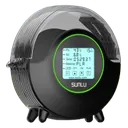
SUNLU FilaDryer S2Top pick
Purpose-built filament dryer. Dries while printing, so a hygroscopic material like TPU never sits in room air mid-print. Doubles as active dry storage between jobs.

SUNLU FilaDryer S1 PlusBudget pick
The budget option for PLA. Simpler than the S2 and rated for at most 55°C: enough for PLA, below the 60–65°C Bambu gives for PETG and the 70°C for TPU. One spool or four? See our SUNLU S2 or S4 comparison.
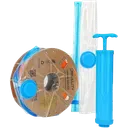
Creality Vacuum Storage KitDry storage
Vacuum bags plus desiccant. Seal spools for long-term storage so they never absorb moisture in the first place. Essential if you don't print daily. Not a dryer: it cannot fix a wet spool.
When you actually need a dryer
Moisture in filament causes more print failures than most people realize. The symptoms: crackling or popping sounds during extrusion, bubbles in the extruded line, weak layer adhesion, rough surface finish, and excessive stringing. If you see these, dry the spool before changing any slicer setting.
How urgent a dryer is depends on what you print:
- PLA: low moisture sensitivity. Fresh spools stored sensibly rarely need drying. Most PLA-only users can start with sealed storage and skip the dryer.
- PETG: medium sensitivity. More moisture-sensitive than PLA; dry it before use if it has been stored open, and store it sealed with desiccant. Wet PETG strings badly.
- TPU: moisture-sensitive and slow to dry (Bambu: 70°C for 8 hours). Wet TPU prints noticeably worse.
- PA (Nylon) and PC: highly hygroscopic. Nylon absorbs moisture from the air rapidly, and the absorbed water causes bubbling, weak layer adhesion, and poor surface finish. Always print these from a dry box or dryer, and dry new spools before first use. For Nylon and PC a dryer is not optional.
More on each material in our materials guide. If your prints already show wet-filament symptoms, see stringing problems and layer splitting.
Not sure how damp your storage gets? Measure instead of guessing: the Veanic mini hygrometer (2-pack) fits the round 46 mm hygrometer slot that popular AMS dry-pod prints on MakerWorld use. Accuracy is about ±5% RH, so it shows the trend, not a lab value.
Affiliate link. We may earn a commission at no extra cost to you.
| Material | Drying temperature (oven) | Time |
|---|---|---|
| PLA | 50°C | 8 hours |
| PETG | 60–65°C | 8 hours |
| ABS / ASA | 75–85°C | 8 hours |
| TPU | 70°C | 8 hours |
| PA (Nylon) | 75–85°C | 8–12 hours |
| PC | 75–85°C | 8 hours |
| PVA | 75–85°C | 8–12 hours (Bambu: always dry PVA before use) |
Values: Bambu Lab drying guide, forced-air oven column (wiki.bambulab.com). Bambu's filament material table gives slightly different single values for some materials (PLA 55°C, PETG 70°C, PVA 55°C).
Check the max temperature before buyingNylon and PC need 75–85°C (Bambu; the AMS HT dries PA at 85°C). Check the manufacturer's stated maximum temperature of any dryer against this table before you buy; not every dryer reaches nylon territory. A food dehydrator ($30–60) also works. Skip the kitchen oven: Bambu says its heat is too uneven and can damage the spool or the filament.
- Temperatures in °C. Drying times are in the table above.
Which one for your setup
You own an AMS 2 Pro
Honest answer: you may not need a dryer at all. The AMS 2 Pro has an active drying mode up to 65°C, which covers PLA and PETG. Where it falls short is engineering materials: PA and PC need 75–85°C (Bambu), beyond what the AMS 2 Pro reaches, so nylon users still want a dedicated dryer. Note the original AMS has no active heating, only a humidity sensor with desiccant; it slows moisture uptake but cannot dry a wet spool.
A1 or A1 mini without AMS
Your spool hangs in open air the entire print, so it absorbs moisture while printing. The S2 fixes this neatly: feed filament directly from the dryer to the external spool input, and the spool stays heated for the whole job. This is the setup where a feed-through dryer earns its money fastest, especially with PETG and TPU.
High-volume and multi-spool users
A single-spool dryer becomes the bottleneck when you rotate many spools. The practical combo: one S2 for active drying and rescue jobs, plus the Creality vacuum kit so every spool goes back into a sealed bag with desiccant the moment it leaves the printer. Drying is then the exception, not the routine.
Want to dry four spools at once? The SUNLU FilaDryer S4 holds four and, like the S2, is rated for 70°C: enough for PLA and PETG, at the limit for TPU, below Bambu's 75–85°C for PA and PC. It fits best next to an original AMS or AMS lite, which cannot dry filament themselves (the AMS 2 Pro and AMS HT dry on their own). View on Amazon
Affiliate link. We may earn a commission at no extra cost to you.
Prevention beats drying: store spools in resealable bags or airtight boxes with silica gel desiccant, and use color-indicator desiccant so you know when to swap it. For PA and PC specifically, keep the spool in its original sealed bag until you are ready to print, then run it from a dry box during the print.
Related reading
- Filament storage and drying guide: which filaments need drying, drying on the AMS 2 Pro, AMS HT or the bed, and storing spools afterwards
- Materials guide: drying temperatures, settings, and printer requirements per material
- All recommended accessories: dryers, plates, tools, and upgrades in one place
- Fix stringing: wet filament is a top cause
- Fix layer splitting: weak layer adhesion from moisture
- AMS jamming: includes how each AMS model handles TPU and moisture